Galerie de prompts IA OpenZhenZhen · Claude Opus 5.5 · video
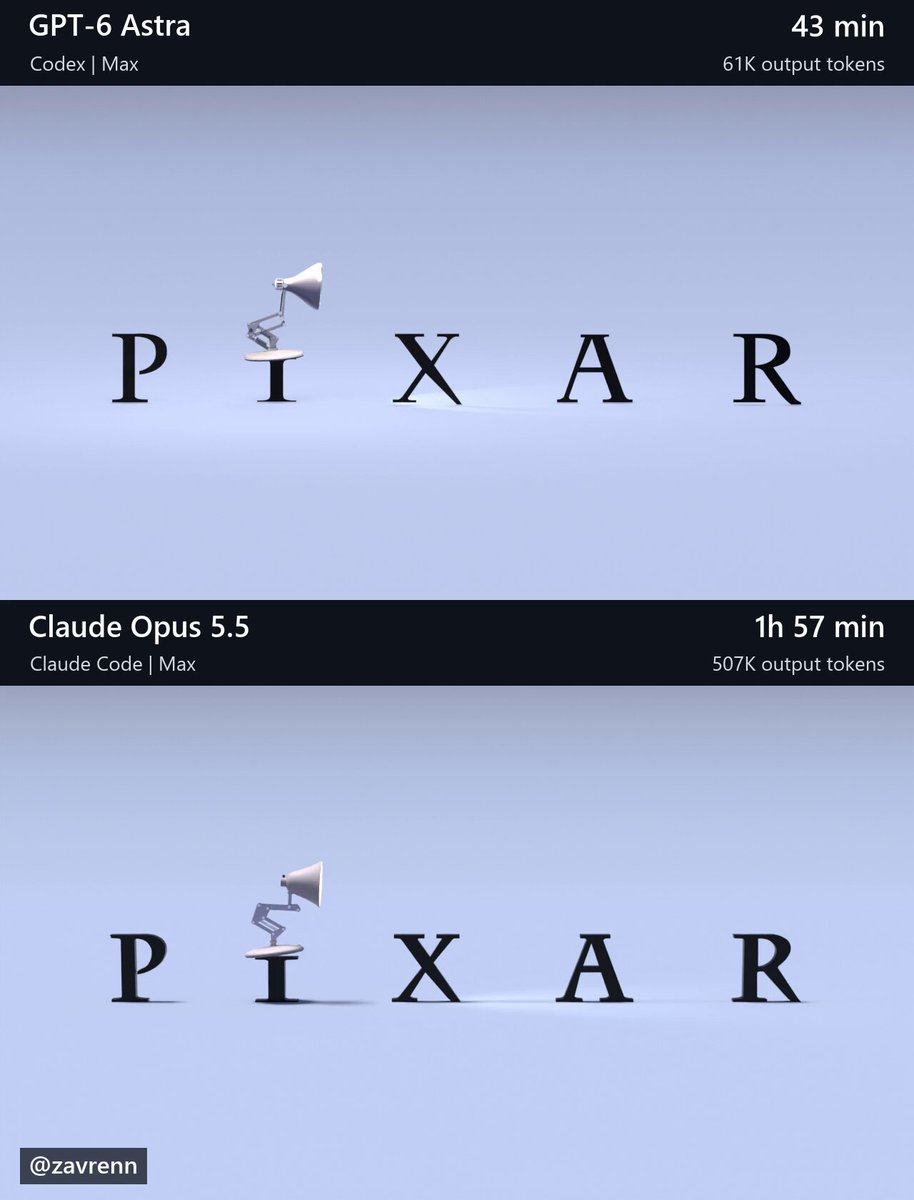
Animation de lampe de bureau articulée sur Blender
Blender Articulated Desk Lamp Animation
Animation de lampe de bureau articulée sur Blender — découvrez cette création avec Claude Opus 5.5 sur OpenZhenZhen, son prompt original et un exemple de génération à réutiliser.
Prompt
Prompt anglais
Create a finished, editable Blender recreation of the six-second animation shown in this workspace’s reference/t\_\*.png images. Open and inspect the reference images before building. Their filenames give seconds from the start of the animation: t\_1.20s.png means 1.20 seconds. Use these images as the visual reference and leave them unchanged. Match the complete composition: the lamp’s proportions and articulated structure, lettering, interactions, camera framing, materials, lighting, shadows, and final fade. Pay particular attention to jump timing, preparation, landings, settling, and head turns. Preserve the reference’s stylized motion and create coherent movement between the sampled poses. Make reasonable choices for unseen details. Build genuine 3D geometry and animation that remain editable. Keep joints connected and contact believable. Do not substitute reference images or footage for geometry, textures, backgrounds, or rendered output. Create the assets yourself using installed tools; do not download assets, browse the web, or use other AI agents or models. Blender is installed at: C:\Program Files\Blender Foundation\Blender 5.2\blender.exe Prepare the final scene at 1280×720, 30 fps, frames 1–180, with frame 1 representing time zero. Use Cycles, 64 samples, and denoising. Preserve the reference lettering; add no extra titles, watermarks, interface, comparison layout, or audio. Render and visually inspect low-resolution previews across the action, including between reference timestamps. Correct visible problems and recheck affected frames. We will render the final video separately. Save scene.blend with the final render settings and a build\_scene.py that rebuilds it from scratch. The saved scene must render without external asset dependencies. Verify that it opens and renders in background mode. Work autonomously through completion, making routine decisions yourself. Finish with a brief report of the saved files, checks actually performed, and remaining limitations.
Thèmes et styles
Découvrir plus de prompts image et vidéo · Générer des images · Générer des vidéos · Créer sur le canevas IA
Œuvres associées
- Île arctique du monde de gelée : Opus contre Astra
Île arctique du monde de gelée : Opus contre Astra — découvrez cette création avec Claude Opus 5.5 sur OpenZhenZhen, son prompt original et un exemple de génération à réutiliser.
- Animation de points d'agents OpenAI : Opus contre GPT-6.1
Animation de points d'agents OpenAI : Opus contre GPT-6.1 — découvrez cette création avec Claude Opus 5.5 sur OpenZhenZhen, son prompt original et un exemple de génération à réutiliser.
- Site animé à partir d'une seule image : Opus contre GPT-6.1
Site animé à partir d'une seule image : Opus contre GPT-6.1 — découvrez cette création avec Claude Opus 5.5 sur OpenZhenZhen, son prompt original et un exemple de génération à réutiliser.
- Comparaison de modèles d'effet gelée
Comparaison de modèles d'effet gelée — découvrez cette création avec Claude Opus 5.5 sur OpenZhenZhen, son prompt original et un exemple de génération à réutiliser.
- Comparaison de dioramas Opus vs Astra (Blender)
Comparaison de dioramas Opus vs Astra (Blender) — découvrez cette création avec Claude Opus 5.5 sur OpenZhenZhen, son prompt original et un exemple de génération à réutiliser.
- Effet Pachinko : version Opus 5.5
Effet Pachinko : version Opus 5.5 — découvrez cette création avec Claude Opus 5.5 sur OpenZhenZhen, son prompt original et un exemple de génération à réutiliser.