OpenZhenZhen AI プロンプトギャラリー · Claude Opus 5.5 · video
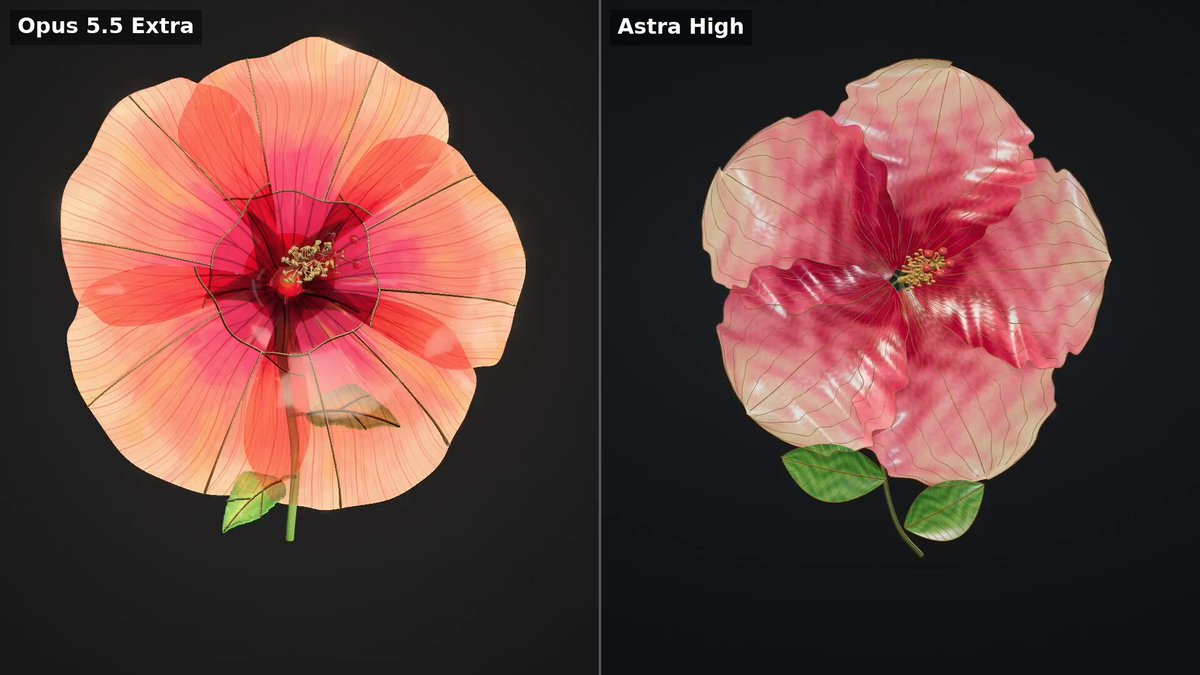
インタラクティブ3Dステンドグラスのハイビスカス
Interactive 3D Stained Glass Hibiscus
「インタラクティブ3Dステンドグラスのハイビスカス」は Claude Opus 5.5 を使用した作品です。OpenZhenZhen で元のプロンプトと生成例を確認し、創作の参考にできます。
プロンプト
英語プロンプト
Create a beautiful, interactive 3D browser artwork of a single stained-glass hibiscus flower. Use the attached leaf as a reference for material delicacy, intricate veins, translucent colours and restrained presentation. Create an original flower composition. The flower is the entire experience. It fills most of the viewport against a quiet, near-black charcoal background. FLOWER Create five broad, organically shaped petals with gently ruffled edges, subtle asymmetry and graceful curvature. Arrange them into a convincing three-dimensional hibiscus, with natural overlap and a clearly visible centre. Each petal is made from thin, luminous stained glass. Blend ruby pink, coral, pale peach and honey amber within the glass, with delicate marbling and fine branching veins radiating from its base. Use extremely thin antique-gold seams and a finely beveled outer edge. Preserve the delicacy of the glass. Include a slender projecting central column with tiny golden anthers, a gracefully curved stem and two small translucent green leaves. MATERIAL AND LIGHT The glass must have visible thickness, coloured light transmission, subtle surface irregularities and crisp reflections that change with the viewing angle. Overlapping petals should remain readable. Balance illumination so the colours stay luminous and the veins remain visible throughout rotation. Avoid large white reflections that erase the detail. Use soft studio lighting with a warm backlight and a restrained rim light. Avoid excessive bloom, neon colour and heavy black outlines. MOVEMENT AND INTERACTION Start immediately with a flattering three-quarter view. Rotate slowly and smoothly so viewers can inspect the curved petals, thin edges and reverse side. Allow dragging to orbit, scrolling to zoom, and a small pause control. Keep the flower fully framed during automatic rotation. DELIVERY Build actual 3D geometry rendered in the browser. Generate the geometry and textures in code. Deliver a working preview and a downloadable, self-contained stained-glass-flower.html with all dependencies embedded. Run the result, inspect a full rotation, and fix missing surfaces, transparency problems, clipping or washed-out lighting before finishing. Prioritize the quality of the flower over interface decoration.
テーマとスタイル
画像・動画プロンプトをもっと見る · 画像を生成 · 動画を生成 · AI キャンバスで作成
関連作品
- ゼリー世界の北極島:Opus 対 Astra
「ゼリー世界の北極島:Opus 対 Astra」は Claude Opus 5.5 を使用した作品です。OpenZhenZhen で元のプロンプトと生成例を確認し、創作の参考にできます。
- OpenAIエージェントのドットアニメーション:Opus対GPT-6.1
「OpenAIエージェントのドットアニメーション:Opus対GPT-6.1」は Claude Opus 5.5 を使用した作品です。OpenZhenZhen で元のプロンプトと生成例を確認し、創作の参考にできます。
- 一枚の画像から動くウェブサイト:Opus 対 GPT-6.1
「一枚の画像から動くウェブサイト:Opus 対 GPT-6.1」は Claude Opus 5.5 を使用した作品です。OpenZhenZhen で元のプロンプトと生成例を確認し、創作の参考にできます。
- ゼリーエフェクトモデル比較
「ゼリーエフェクトモデル比較」は Claude Opus 5.5 を使用した作品です。OpenZhenZhen で元のプロンプトと生成例を確認し、創作の参考にできます。
- Opus対Astra ジオラマ比較(Blender)
「Opus対Astra ジオラマ比較(Blender)」は Claude Opus 5.5 を使用した作品です。OpenZhenZhen で元のプロンプトと生成例を確認し、創作の参考にできます。
- パチンコ効果:作品5.5版
「パチンコ効果:作品5.5版」は Claude Opus 5.5 を使用した作品です。OpenZhenZhen で元のプロンプトと生成例を確認し、創作の参考にできます。