OpenZhenZhen AI プロンプトギャラリー · gpt-image-2.5 · image
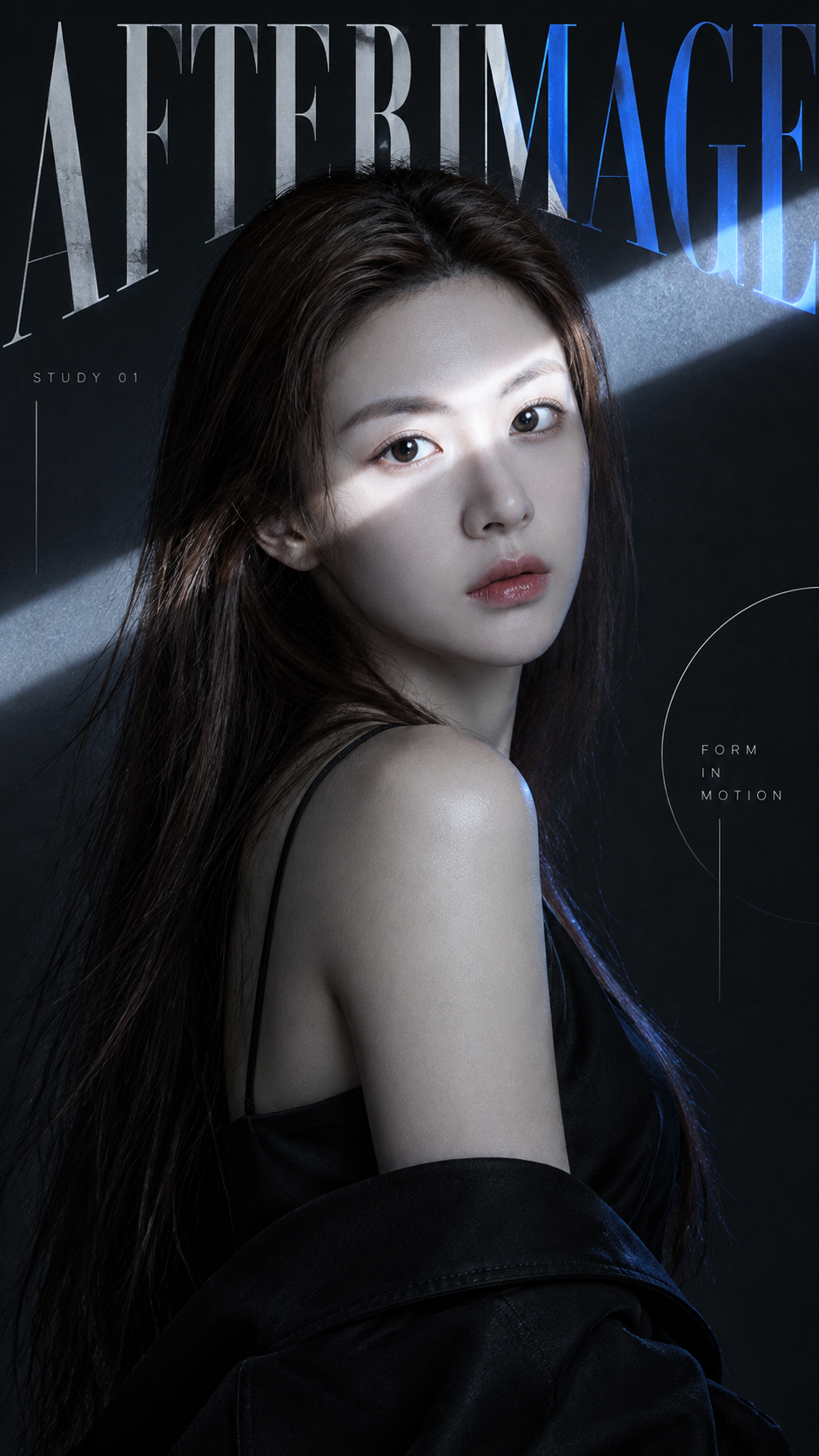
実験的ファッション・エディトリアル肖像ポスターの視覚的介入
Experimental Fashion Editorial Portrait Poster Visual Intervention
「実験的ファッション・エディトリアル肖像ポスターの視覚的介入」は gpt-image-2.5 を使用した作品です。OpenZhenZhen で元のプロンプトと生成例を確認し、創作の参考にできます。
プロンプト
中国語プロンプト
使用用户上传的参考图作为主要可见人物的面部身份依据。创作一张9:16实验性社论肖像海报,主体为adult fashion portrait subject,并且只使用一种强烈而受控的视觉干预:narrow light beam。使用标题AFTERIMAGE、black, white, cool gray, electric blue accent的受控调色板,以及sharp, cinematic, restrained, experimental的整体情绪。从引人注目的特写或半身时尚肖像开始:主体在画面中占据较大比例,具有清晰面部情绪、自然皮肤纹理、真实头发和强烈轮廓;在加入图形处理前,摄影本身就应具备时尚照片水准。只应用所选干预方式:若为色彩分割,使用穿过脸部和身体的不均匀半透明条带,有选择地揭示或偏移颜色;若为窄光束,保持场景清冷克制,让一道光束横穿眼睛、鼻子或脸颊并自然延伸至周围空间;若为水平切割,用大胆条带和超大排版重组肖像的选定部分;若为动态面纱,保持主肖像清晰,让眼睛、嘴巴或肩膀等局部拉伸成柔和的水平摄影运动轨迹,绝不做成数字故障。让AFTERIMAGE成为构图的一部分:字母可以裁切出画布、与主体重叠、隐藏在身体后方,或在经过干预区域时发生变化。辅助文字保持极简,只加入STUDY 01和FORM IN MOTION。调色以黑、白、灰或深中性色为主,辅以一种强调色;保持肤色自然,避免发黄调色。如有需要,仅加入少量细线、圆圈或开放式边角标记。最终应像当代时尚社论或艺术指导实验,而不是普通模板。避免相互竞争的多重效果、密集微型文字、UI图形、重度故障、随机拼贴、编号、Vol./Issue标签、四角星光符号、标志、水印和解剖结构扭曲。
英語プロンプト
Use the uploaded reference image as the facial identity reference for the main visible person. Create a 9:16 experimental editorial portrait poster featuring adult fashion portrait subject and exactly one strong visual intervention: narrow light beam. Use the headline AFTERIMAGE, a controlled palette of black, white, cool gray, electric blue accent, and an overall mood of sharp, cinematic, restrained, experimental. Begin with a striking close or waist-up fashion portrait: keep the subject large in frame with clear facial emotion, natural skin texture, realistic hair, and a strong silhouette. The photograph must work as a fashion image before graphic treatment. Apply only the selected intervention. For color split, use uneven translucent bands passing through face and body to selectively reveal or shift color. For a narrow light beam, keep the scene cool and restrained while one beam cuts across the eyes, nose, or cheek and continues naturally into the surrounding space. For a horizontal cut, use bold bands and oversized typography to reorganize selected parts of the portrait. For a motion veil, keep the main portrait sharp while selected eyes, mouth, or shoulders stretch into soft horizontal photographic motion trails, never a digital glitch. Make AFTERIMAGE part of the composition: crop letters off canvas, overlap the subject, hide them behind the body, or let them change through the intervention. Add only minimal supporting text: STUDY 01 and FORM IN MOTION. Use mostly black, white, gray, or deep neutrals plus one accent, keep skin tones natural, and avoid yellow grading. Add only a few fine lines, circles, or open corner marks if needed. The result should feel like a contemporary fashion editorial or art-direction experiment, not a generic template. Avoid competing effects, dense micro-text, UI graphics, heavy glitch, random collage, numbering, Vol./Issue labels, four-point sparkles, logos, watermarks, and distorted anatomy.
画像・動画プロンプトをもっと見る · 画像を生成 · 動画を生成 · AI キャンバスで作成
関連作品
- 90年代クールトーン仙侠風 翡翠色漢服の人物像
「90年代クールトーン仙侠風 翡翠色漢服の人物像」は gpt-image-2.5 を使用した作品です。OpenZhenZhen で元のプロンプトと生成例を確認し、創作の参考にできます。
- 超精巧3Dコミック風スター收藏ポスター
「超精巧3Dコミック風スター收藏ポスター」は gpt-image-2.5 を使用した作品です。OpenZhenZhen で元のプロンプトと生成例を確認し、創作の参考にできます。
- レトロレーシングポスターのデザインプロンプト
「レトロレーシングポスターのデザインプロンプト」は gpt-image-2.5 を使用した作品です。OpenZhenZhen で元のプロンプトと生成例を確認し、創作の参考にできます。
- ちびキャラチャットスタンプ生成プロンプト
「ちびキャラチャットスタンプ生成プロンプト」は gpt-image-2.5 を使用した作品です。OpenZhenZhen で元のプロンプトと生成例を確認し、創作の参考にできます。
- 子ども向け科学百科ポスター ミツバチを知ろう
「子ども向け科学百科ポスター ミツバチを知ろう」は gpt-image-2.5 を使用した作品です。OpenZhenZhen で元のプロンプトと生成例を確認し、創作の参考にできます。
- ファッションカラーブロックコラージュポートレート写真
「ファッションカラーブロックコラージュポートレート写真」は gpt-image-2.5 を使用した作品です。OpenZhenZhen で元のプロンプトと生成例を確認し、創作の参考にできます。