OpenZhenZhen AI プロンプトギャラリー · gpt-image-2.5 · image
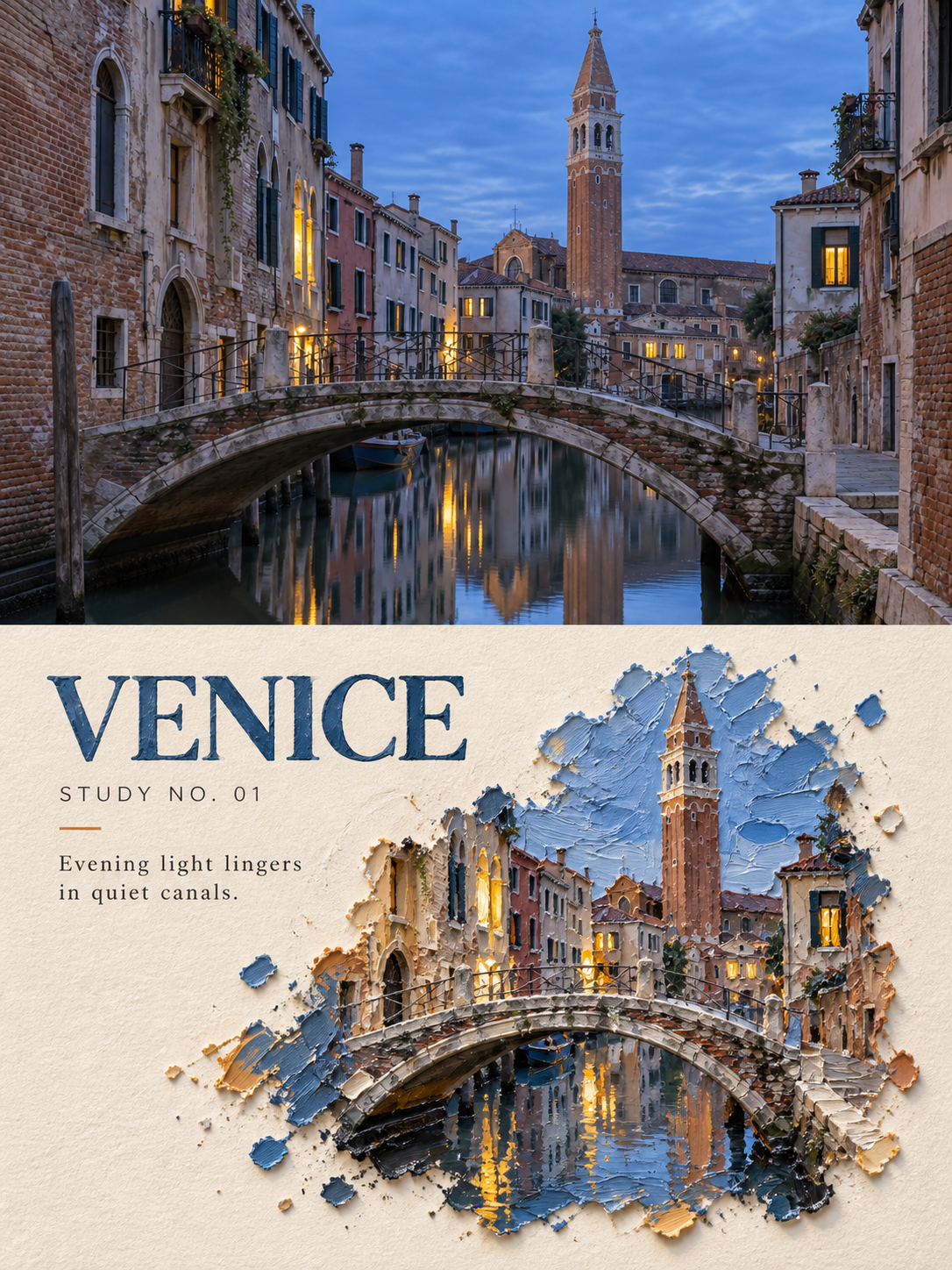
旅行写真のための高級アクリル厚塗りポスターデザイン
Premium Acrylic Impasto Poster Design for Travel Photos
「旅行写真のための高級アクリル厚塗りポスターデザイン」は gpt-image-2.5 を使用した作品です。OpenZhenZhen で元のプロンプトと生成例を確認し、創作の参考にできます。
プロンプト
中国語プロンプト
图1是为travel_photo生成的配套素材,作为本次编辑工作流对应位置实际使用的输入图像。 使用上传的 travel_photo 作为本次编辑的唯一来源照片。每张旅行照片分别制作一张独立高级设计海报并单独输出,不得多图拼接。 采用 3:4 竖版,由真实照片区与风格化转绘区组成。真实照片约占全画面 40%–50%,转绘区占另一主要部分;两区使用笔直、清楚、无羽化和渗透的水平边界。可依主体适当调节比例,但必须清楚呈现原图与转绘的对照。 真实照片区忠实使用 travel_photo,准确保留其中主体的身份与数量、建筑结构、地形、人物或交通工具、观察角度、空间关系、真实材质、自然光影与原有色彩。仅做克制的艺术出版物或摄影展调色,并加入极薄胶片颗粒;不得扭曲、镜像、移动、增删或重塑主体。 转绘区使用温暖象牙色天然纸张,保留约 38%–55% 连续纸面留白。不要按原照片完整取景等比例重画;只提取照片中一个最具识别度的主体、建筑组合、交通工具或地形关系,重组为安放在纸面上的“厚涂记忆微缩”。 主体必须嵌入一块不规则重体丙烯颜料中,像从颜料内部生长。颜料呈现约 5–15 毫米视觉厚度,清楚表现调色刀峰脊、圆钝隆起、深沟、刮痕、抬起的厚边、颜料侧壁、堆积断面、微小颜料碎屑、局部湿润反光与干燥哑光差异,并在纸面投下短而清楚的真实接触影。厚度来自真实丙烯颜料体积、侧壁和调色刀痕,不得做成叠纸、撕纸、纸浆、石膏板、浮雕纸片或普通微缩模型。 依据照片主体选择颜料岛:高塔、教堂或建筑群可形成垂直堆积的颜料山体;湖面、道路、海岸或车辆可形成低矮横向颜料岛;单一人物、船只或小主体可缩小后嵌入少量颜料笔触。只保留地点身份与故事所需的最少结构,让建筑或主体外缘逐渐融入刮刀色块、颜料碎屑和裸纸,禁止形成矩形风景画。色盘完全从 travel_photo 提取,压缩为 1–3 个主色、一种深色和小面积强调色。 加入清楚可读的编辑文字:1–3 个英文单词的地点或主题标题、固定档案字段“STUDY NO. 01”,以及一句 5–12 个英文单词的原创观察句。文字只可来自 travel_photo 中真实可见的主体、天气、动作或空间感受。主标题在普通预览尺寸必须清晰,可像被刮刀压入颜料边缘;辅助文字放在裸纸区,使用带轻微干刷缺口的窄体人文无衬线或温和衬线字体。 整体安静、克制、诗意,具有真实手工重量和艺术出版物收藏质感。避免纸张叠层、撕纸、纸浆、石膏片、平面贴花、平涂色块、光滑数字笔刷、普通微缩模型、塑料 CGI、树脂、同裁切重画、满背景绘画、矩形重复照片、缺失原图对照、不可读小字、悬浮数字排版、卡通、Logo、水印、画框或墙面样机。
英語プロンプト
Image 1 is the generated supporting image for travel_photo; use it as the actual input for the corresponding slot in this editing workflow. Use the uploaded travel_photo as the sole source photograph for this edit. Turn each travel photo into one independent high-end design poster and output it separately; never stitch multiple photos together. Use a 3:4 vertical composition with a real-photo area and a stylized transformation area. The real photo occupies about 40%–50% of the frame and the transformation occupies the other main area. Separate them with a straight, clear horizontal boundary without feathering or bleeding. Proportions may respond to the subject, but the comparison between source and transformation must remain obvious. Use travel_photo faithfully in the real-photo area. Preserve subject identity and count, architecture, terrain, people or vehicles, viewpoint, spatial relationships, authentic materials, natural light and shadow, and original colors. Apply only restrained art-publication or photography-exhibition grading and very thin film grain. Never distort, mirror, move, add, remove, or reshape a subject. Use warm ivory natural paper in the transformation area and retain about 38%–55% continuous paper whitespace. Do not redraw the full source framing proportionally. Extract only one most recognizable subject, architectural group, vehicle, or terrain relationship from the photo and reorganize it as an “impasto memory miniature” resting on the paper. Embed the subject in an irregular mass of heavy-body acrylic paint as though it grows from the pigment. Show a visual paint thickness of about 5–15 mm, with clear palette-knife ridges, blunt bulges, deep grooves, scratches, raised thick edges, paint sidewalls, accumulation cross-sections, tiny paint debris, local wet reflections versus dry matte areas, and short real contact shadows on the paper. Thickness must come from acrylic volume, sidewalls, and knife marks, never layered paper, torn paper, papier-mâché, plasterboard, embossed paper, or an ordinary miniature model. Choose the paint-island shape from the photo: towers, churches, or building groups may form vertically stacked paint mountains; lakes, roads, coasts, or vehicles may form low horizontal islands; a single person, boat, or small subject may be reduced and embedded in a few paint strokes. Keep only the minimum structure required for location identity and story. Let the subject edges dissolve into knife-applied color blocks, paint debris, and bare paper without becoming a rectangular landscape painting. Extract the palette entirely from travel_photo and compress it to 1–3 main colors, one dark color, and one small accent. Add clearly readable editorial text: a 1–3 word English location or theme title, the fixed archive field “STUDY NO. 01”, and one original 5–12 word English observation sentence. Derive all text only from subjects, weather, action, or spatial feeling visibly present in travel_photo. Keep the title readable at ordinary preview size; it may look pressed into the paint edge by a palette knife. Put auxiliary text on bare paper in a narrow humanist sans serif or gentle serif with slight dry-brush gaps. The result is quiet, restrained, poetic, physically handmade, and collectible like an art publication. Avoid layered paper, torn paper, papier-mâché, plaster sheets, flat appliqué, flat paint patches, smooth digital brushes, ordinary miniature models, plastic CGI, resin, same-crop repainting, full-background painting, rectangular duplicate photos, missing source-photo comparison, tiny unreadable text, floating digital typography, cartoons, logos, watermarks, frames, and wall mockups.
画像・動画プロンプトをもっと見る · 画像を生成 · 動画を生成 · AI キャンバスで作成
関連作品
- オリジナル3Dカワウソ4コマ絵文字ステッカー
「オリジナル3Dカワウソ4コマ絵文字ステッカー」は gpt-image-2.5 を使用した作品です。OpenZhenZhen で元のプロンプトと生成例を確認し、創作の参考にできます。
- スマホ参考を同じ画面に収めた鉛筆肖像スケッチ
「スマホ参考を同じ画面に収めた鉛筆肖像スケッチ」は gpt-image-2.5 を使用した作品です。OpenZhenZhen で元のプロンプトと生成例を確認し、創作の参考にできます。
- 灰色のスタジオで戯れるミニ分身
「灰色のスタジオで戯れるミニ分身」は gpt-image-2.5 を使用した作品です。OpenZhenZhen で元のプロンプトと生成例を確認し、創作の参考にできます。
- 金刺繍の牡丹 新中式 黒茶のファッションポートレート
「金刺繍の牡丹 新中式 黒茶のファッションポートレート」は gpt-image-2.5 を使用した作品です。OpenZhenZhen で元のプロンプトと生成例を確認し、創作の参考にできます。
- グレートーンのスタジオで撮影されたレザーファッションポートレート
「グレートーンのスタジオで撮影されたレザーファッションポートレート」は gpt-image-2.5 を使用した作品です。OpenZhenZhen で元のプロンプトと生成例を確認し、創作の参考にできます。
- プラチナサイバーアーマーナイト
「プラチナサイバーアーマーナイト」は gpt-image-2.5 を使用した作品です。OpenZhenZhen で元のプロンプトと生成例を確認し、創作の参考にできます。