OpenZhenZhen AI プロンプトギャラリー · gpt-image-2.5 · image
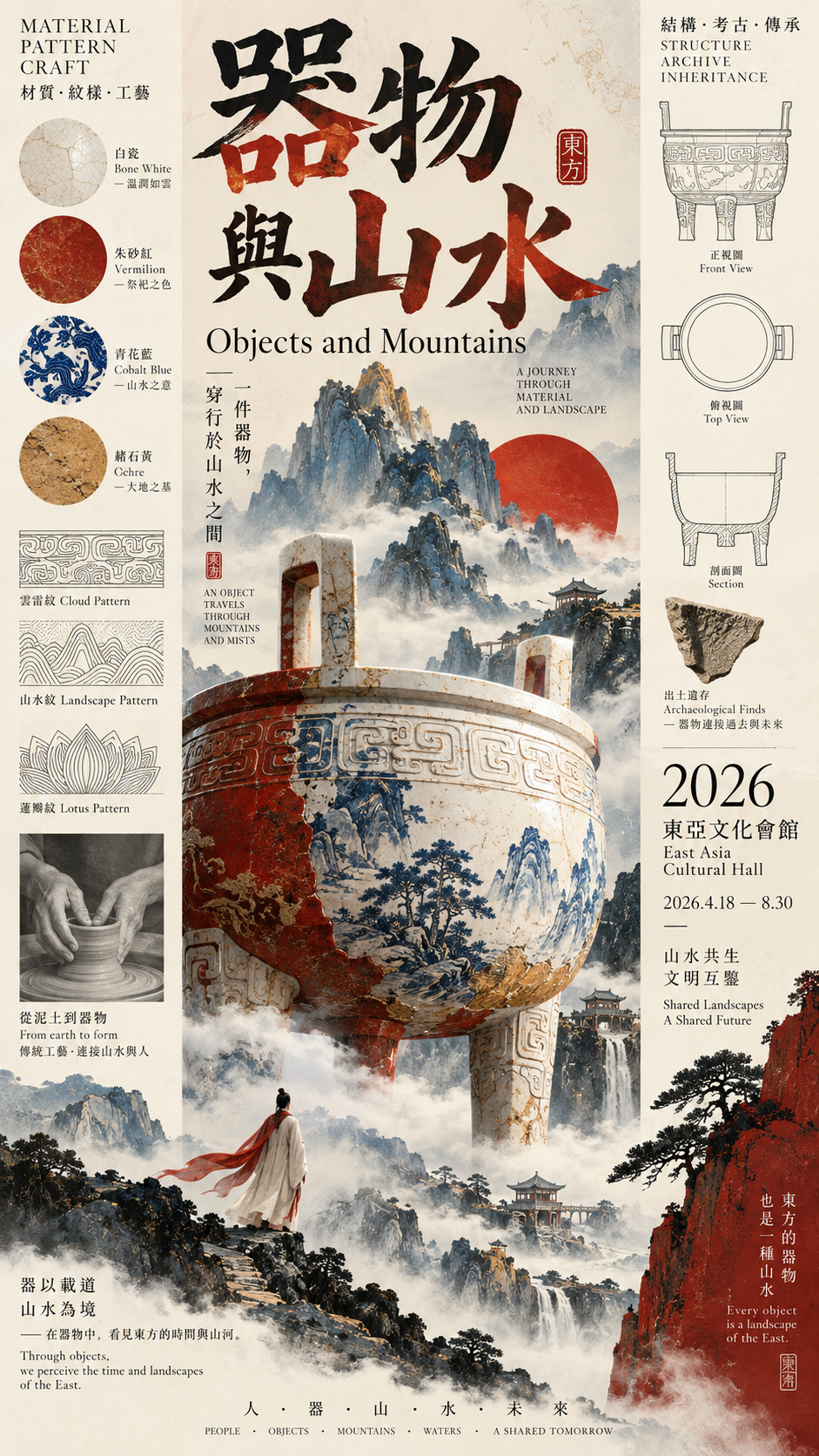
東洋文化 縦三列 展覧会ポスターテンプレート
Oriental Culture Three-Column Exhibition Poster Template
「東洋文化 縦三列 展覧会ポスターテンプレート」は gpt-image-2.5 を使用した作品です。OpenZhenZhen で元のプロンプトと生成例を確認し、創作の参考にできます。
プロンプト
中国語プロンプト
主题:Ceramic, cloud and mountain material study;中文标题:器物与山水;英文标题:Objects and Mountains;核心主体:A ceremonial vessel crossing a misty mountain scene;三栏关系:Artifact Crossing;左栏内容:material samples and pattern research;中栏内容:the main vessel and mountain image;右栏内容:structure, date and venue archive;主色调:bone white, vermilion, cobalt blue and ochre;日期/场馆:2026 / East Asia Cultural Hall;画面比例:9:16。生成一张高审美、高信息密度的东方文化展览海报,采用竖三栏左中右构图。三栏不可平均切分,也不可做成三个独立信息框;根据主题灵活调整宽度,让各栏承担不同视觉职责,再通过主体、文字、线条或材质跨越栏线,把区域重新连接成完整画面。可采用人物跨栏、同一主体三栏变化、中栏主景或器物跨栏:人物可主要位于中栏并让衣袖、裙摆或饰物进入左右栏;连续主体须同时穿过三栏,在各栏呈现不同材质、阶段或状态但轮廓连续;最强主景置于中栏,左右栏承载标题、日期、材质和研究信息,并允许主体或云雾越栏;大型器物可斜向或横向打破竖向网格。根据结构重新设计字体,可用超大单字、完整横排、跨栏标题、中等标题或小型信息脊柱;不要固定四字纵排或“两字横排+两字竖排”模板。信息密度接近成熟博物馆海报、艺术图录和Editorial Design:加入英文副标题、材质、结构、日期、场馆、策展短句和少量结构线稿、材质研究、制作流程、剖面或纹样研究,但集中在2—3个区域,不平均铺满。使用3—5种主要颜色和大面积纯色域,允许黑、骨白、朱红、钴蓝、深青、赭色组合,避免脏灰、严重做旧和复杂渐变。要求高清、清晰、干净、信息丰富而有秩序,主体比例准确,文字和细线锐利,达到成熟文化展览海报完成度。避免机械三等分、三个独立卡片、PPT信息框、固定标题、主体过小、栏位割裂、随机小字、无意义装饰线、过度做旧、斑驳噪点和低完成度AI海报感。
英語プロンプト
Theme: Ceramic, cloud and mountain material study. Chinese title: 器物与山水. English title: Objects and Mountains. Core subject: A ceremonial vessel crossing a misty mountain scene. Three-column relationship: Artifact Crossing. Left column content: material samples and pattern research. Middle column content: the main vessel and mountain image. Right column content: structure, date and venue archive. Main color palette: bone white, vermilion, cobalt blue and ochre. Date / venue: 2026 / East Asia Cultural Hall. Aspect ratio: 9:16. Generate a high-aesthetic, high-information-density Oriental culture exhibition poster in a vertical left-middle-right three-column composition. Do not divide the columns equally or turn them into three independent information boxes. Adjust widths according to the theme so each column has a different visual responsibility, then actively cross column lines with subjects, text, lines or materials to reconnect the areas into one complete image. Choose a suitable structure: character crossing, same-subject three-column variation, middle-column main scene or artifact crossing. A character may occupy the middle while sleeves, skirt hems or ornaments enter the side columns; a continuous subject may pass through all columns with different materials, stages or states but one uninterrupted outline; the strongest mountain, building or image may anchor the middle while titles, dates, materials and research occupy the sides, with subject or mist crossing columns; a large artifact may enter other columns diagonally or horizontally to break the vertical grid. Redesign typography to suit the image using an oversized single character, full horizontal title, cross-column title, medium title or small information spine. Never force a fixed four-character vertical layout or a two-horizontal-plus-two-vertical title template. Keep information density close to a mature museum poster, art catalog and editorial design: include an English subtitle, materials, structures, date, venue, a short curatorial sentence and a small amount of structural, material, process, sectional or pattern research drawing, concentrated in 2–3 areas rather than spread evenly. Use 3–5 main colors with large clean fields; black, bone white, vermilion, cobalt blue, deep cyan and ochre are suitable, while dirty gray, heavy aging and complex gradients are not. Deliver high definition, clean order, accurate subject proportions, sharp lettering and fine lines at the completion level of a mature cultural exhibition poster. Avoid mechanical three-way splitting, three independent cards, PPT information boxes, fixed title templates, undersized subjects, fragmented columns, random small text, meaningless decorative lines, excessive aging, mottled noise and a low-completion AI-poster feel.
画像・動画プロンプトをもっと見る · 画像を生成 · 動画を生成 · AI キャンバスで作成
関連作品
- 90年代クールトーン仙侠風 翡翠色漢服の人物像
「90年代クールトーン仙侠風 翡翠色漢服の人物像」は gpt-image-2.5 を使用した作品です。OpenZhenZhen で元のプロンプトと生成例を確認し、創作の参考にできます。
- 超精巧3Dコミック風スター收藏ポスター
「超精巧3Dコミック風スター收藏ポスター」は gpt-image-2.5 を使用した作品です。OpenZhenZhen で元のプロンプトと生成例を確認し、創作の参考にできます。
- レトロレーシングポスターのデザインプロンプト
「レトロレーシングポスターのデザインプロンプト」は gpt-image-2.5 を使用した作品です。OpenZhenZhen で元のプロンプトと生成例を確認し、創作の参考にできます。
- ちびキャラチャットスタンプ生成プロンプト
「ちびキャラチャットスタンプ生成プロンプト」は gpt-image-2.5 を使用した作品です。OpenZhenZhen で元のプロンプトと生成例を確認し、創作の参考にできます。
- 子ども向け科学百科ポスター ミツバチを知ろう
「子ども向け科学百科ポスター ミツバチを知ろう」は gpt-image-2.5 を使用した作品です。OpenZhenZhen で元のプロンプトと生成例を確認し、創作の参考にできます。
- ファッションカラーブロックコラージュポートレート写真
「ファッションカラーブロックコラージュポートレート写真」は gpt-image-2.5 を使用した作品です。OpenZhenZhen で元のプロンプトと生成例を確認し、創作の参考にできます。