OpenZhenZhen AI 프롬프트 갤러리 · gpt-image-2.5 · image
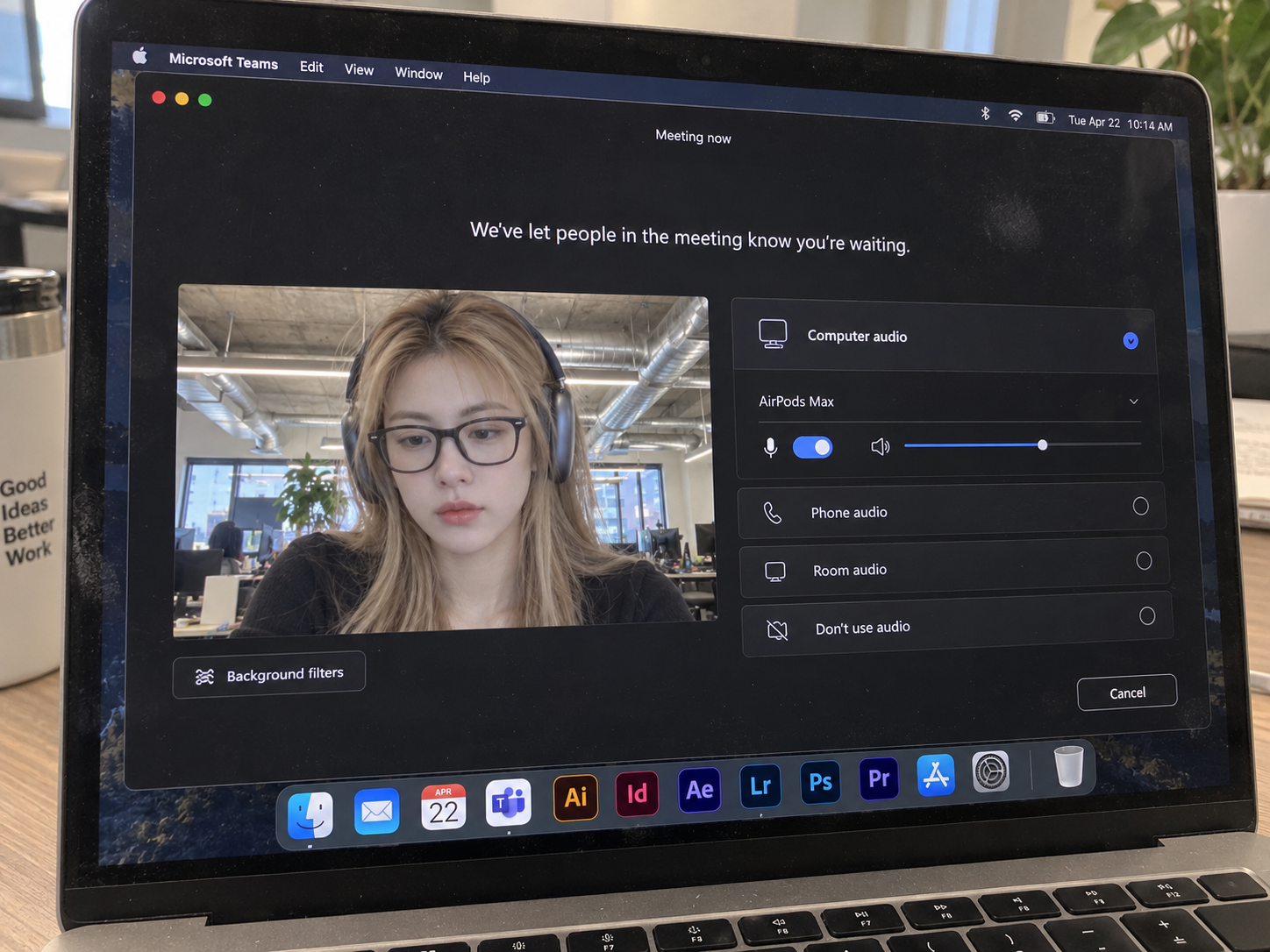
MacBook에서 Teams 대기 화면 실사
Real photo of the Teams waiting room on a MacBook
‘MacBook에서 Teams 대기 화면 실사’은(는) gpt-image-2.5로 만든 작품입니다. OpenZhenZhen에서 원본 프롬프트와 생성 예시를 살펴보고 새로운 창작에 활용해 보세요.
프롬프트
중국어 프롬프트
Use the uploaded reference image as the facial identity reference for the main visible person. Keep the source scene, styling, clothing, pose, composition, lighting and visual style unless they conflict with the identity reference. 生成一张由iPhone手持拍摄的真实笔记本屏幕照片,而非直接截屏:画面主体为打开macOS版Microsoft Teams的MacBook屏幕,手机镜头略微偏轴拍摄,可见真实屏幕像素、轻微摩尔纹、少量灰尘与指纹,以及只出现在深色区域、偏离中心且极弱的玻璃反光;反光不形成镜面或第二张脸,并绝不遮挡界面文字和图标。屏幕展示深色模式的Teams会议候会界面,顶部状态文字严格为“Meeting now”,中央提示严格为“We've let people in the meeting know you're waiting.”,背景为纯黑。左下角放置横向比例的视频预览,摄像头开启,预览下方可见背景滤镜按钮。预览中是一位明确成年女性(25岁以上),自然金发、柔软刘海与松散层次发型,黑色Wayfarer风格处方眼镜、深空灰色包耳式耳机、简约中性色上衣;她神情平静专注,视线略向下。面部身份由配置参考图ref-10a-v1引导并保持可辨认一致,不承诺完全复制。预览背景为现代开放式办公室,可见裸露工业风管与柔和日光混合室内照明。右侧电脑音频区标题严格为“Computer audio”,选中的设备为“AirPods Max”,有水平蓝色音量指示条、关闭状态的静音开关,并列出“Phone audio”“Room audio”“Don't use audio”三个选项;右下角有圆角“Cancel”按钮。屏幕边缘局部显示macOS菜单栏与Big Sur及更新版本风格的Dock,图标顺序清楚且仅包含Finder、Mail、Calendar、Microsoft Teams、Adobe Illustrator、Adobe InDesign、Adobe After Effects、Adobe Lightroom、Adobe Photoshop、Adobe Premiere Pro、App Store、System Settings。保持自然显示器对比度、中性真实饱和度与准确白平衡;不要出现Zoom或Google Meet界面、虚假按钮、错字乱码、错位面板、AI风格UI、错误Dock图标、塑料皮肤、过度锐化或镜像式屏幕反射。
영어 프롬프트
Use the uploaded reference image as the facial identity reference for the main visible person. Keep the source scene, styling, clothing, pose, composition, lighting and visual style unless they conflict with the identity reference. Create a realistic handheld iPhone photograph of a MacBook display, not a direct screenshot. The laptop shows Microsoft Teams for macOS in a meeting waiting room. Photograph the screen slightly off-axis and retain subtle real display pixels, mild moiré, a little dust and fingerprint residue. Add only a very faint, off-center glass reflection confined to dark areas; it must not look like a mirror or a second face and must never obscure UI text or icons. Show the Teams waiting room in pure-black dark mode. The top status reads exactly 'Meeting now'; the centered message reads exactly 'We've let people in the meeting know you're waiting.' Place a landscape video preview at lower left with the camera on and a background-filters button directly below it. In the preview, show a clearly adult woman, age 25+, with natural blonde hair, soft bangs and loose layers, black Wayfarer-style prescription glasses, space-gray over-ear headphones, and a minimal neutral top. Her expression is calm and focused, with her gaze slightly downward. Guide her facial identity with configured reference ref-10a-v1 and keep it recognizably consistent without promising an exact copy. Her preview background is a modern open office with exposed industrial ducts, soft daylight mixed with interior office lighting. On the right, show a computer-audio section titled exactly 'Computer audio', the selected device 'AirPods Max', a horizontal blue volume indicator, an unmuted toggle and the three options 'Phone audio', 'Room audio' and 'Don't use audio'. Put a rounded 'Cancel' button at bottom right. Partially reveal the macOS menu bar and a Big Sur-or-later Dock, with clearly ordered icons for Finder, Mail, Calendar, Microsoft Teams, Adobe Illustrator, Adobe InDesign, Adobe After Effects, Adobe Lightroom, Adobe Photoshop, Adobe Premiere Pro, App Store and System Settings. Keep display contrast natural, saturation neutral and realistic, and white balance accurate. Avoid Zoom or Google Meet UI, fake controls, misspellings or gibberish, misaligned panels, AI-looking interface styling, incorrect Dock icons, plastic skin, oversharpening and mirror-like screen reflections.
더 많은 이미지·동영상 프롬프트 보기 · 이미지 생성 · 동영상 생성 · AI 캔버스에서 만들기