OpenZhenZhen AI 프롬프트 갤러리 · gpt-image-2.5 · image
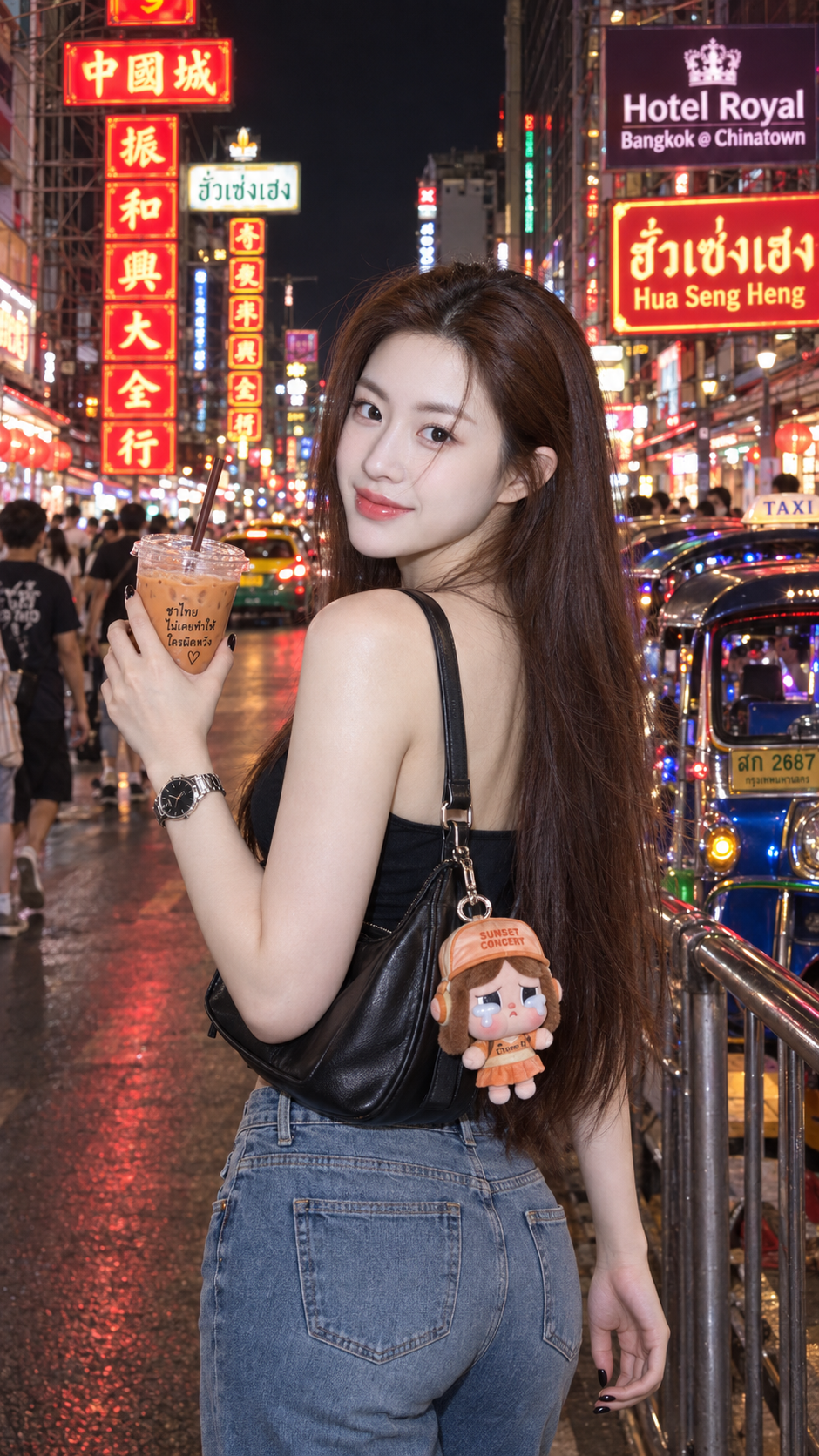
방콕 야오와랏 거리 야경 뒤돌아보는 인물
Portrait Looking Back on Yaowarat Road at Night, Bangkok
‘방콕 야오와랏 거리 야경 뒤돌아보는 인물’은(는) gpt-image-2.5로 만든 작품입니다. OpenZhenZhen에서 원본 프롬프트와 생성 예시를 살펴보고 새로운 창작에 활용해 보세요.
프롬프트
중국어 프롬프트
以用户上传的参考图作为主要可见人物的面部身份依据。在不与身份参考冲突的情况下,保留来源的场景、造型、服装、姿势、构图、光线和视觉风格。 创作一张9:16竖幅、色彩鲜明且超写实的曼谷唐人街耀华力路夜景街拍。主要人物是一位明确成年的女性;仅使用ref-10a-v1作为面部身份依据。面部保持自然,不经风格化改造,并摘掉眼镜;保留真实面部结构与皮肤质感。采用半身至四分之三身构图,同时展示关键服装和配饰。她背对或略侧背朝向镜头,展示发型与牛仔裤,再越过左肩转头直视镜头,露出明朗、友善、俏皮的笑容;腰肩自然扭转。左手举起一杯带吸管的透明塑料杯泰式奶茶,右手放松垂在身侧。 头发为浓密、笔直的深棕色长发,几缕碎发随风飘动,少量发丝自然掠过脸侧。妆容清新水润,深棕色眼睛、根根分明的卷翘睫毛、柔和粉色腮红和粉色渐变唇彩;避免塑料皮肤或过度油亮。身材比例自然,时尚呈现得体、不露骨。若用户在使用时提供服装照片,仅将其用于服装细节,不用于面部身份;若未提供,则按文字描述搭配:黑色单肩包,挂有Pop Mart Cry Baby Sunset Concert毛绒钥匙扣;黑色甲油胶指甲;左腕佩戴银色表壳、黑色表盘的GUESS手表;颈部佩戴极小的黑色四叶草吊坠项链。 场景设在耀华力路繁华夜市,深色夜空衬托红、绿、黄霓虹招牌。显眼背景包含沿街排列、文字层叠的高大竖向中文霓虹灯。在画面右上方放置两处准确且可读的招牌文字:“Hotel Royal Bangkok @ Chinatown”和“Hua Seng Heng”。街边停放数辆带装饰灯的蓝绿色嘟嘟车,远处有一辆略微虚化的黄绿色出租车。加入柔和虚化、正在行走的人群,不要抢走主体注意力;人物站立位置旁设置金属行人隔离栏。使用直接正面光或轻微闪光灯效果,让人物在夜景中明亮突出,同时保留真实阴影与色彩。面部、头发、妆容和衣料细节清晰,整体保持自然高端街拍质感。避免改变人物身份、幼态或未成年形象、眼镜、夸张解剖、多余或粘连手指、杯子或吸管变形、手臂融合、服装与身体穿模、僵硬姿势、地标文字错乱、额外标志、水印、强HDR、过度锐化、卡通、CGI、清晰度不足或影棚感。
영어 프롬프트
Use the uploaded reference image as the facial identity reference for the main visible person. Keep the source scene, styling, clothing, pose, composition, lighting and visual style unless they conflict with the identity reference. Create a vibrant, ultra-realistic 9:16 vertical night street photograph on Yaowarat Road in Bangkok Chinatown. The main subject is one clearly adult woman; use ref-10a-v1 as the only facial identity reference. Keep her face natural and unchanged by stylization, remove glasses, and retain realistic facial structure and skin texture. Frame her as a half-body/three-quarter portrait while showing the key outfit and accessories. She stands back or slightly side-back to camera to show her hairstyle and jeans, then turns over her left shoulder to look directly into the lens with a bright, friendly, playful smile. Twist her waist and shoulders naturally. Her left hand raises a clear plastic cup of Thai tea with a straw; her right hand rests relaxed at her side. Give her very long, thick, straight dark-brown hair, with a few loose strands moving in the breeze and a small natural strand falling across her face. Use a fresh dewy makeup look with deep-brown eyes, separated curled lashes, soft pink cheeks and pink gradient lip gloss, while avoiding plastic skin or excessive shine. Keep the figure naturally proportioned and the fashion presentation non-explicit. If the user supplies an outfit photo at use time, use it only for clothing details, never for facial identity; if absent, follow this described outfit: a black shoulder bag with a Pop Mart Cry Baby Sunset Concert plush keychain, black gel nails, a GUESS watch with silver case and black dial on the left wrist, and a tiny black clover pendant necklace. Set the scene in lively Yaowarat night traffic, with a dark sky and vivid red, green and yellow shop neon. Tall vertical Chinese neon signs with stacked characters form the prominent background. In the upper-right background, show the exact readable signs "Hotel Royal Bangkok @ Chinatown" and "Hua Seng Heng". Park several blue/green tuk-tuks with decorative lights along the street and place a yellow-green taxi far behind, slightly blurred. Add a softly blurred moving pedestrian crowd that does not compete with the subject, plus a metal pedestrian barrier beside where she stands. Use direct frontal light or a subtle camera-flash effect to make her bright against the night while preserving realistic shadows and color. Keep face, hair, makeup and clothing fabric detailed and the street-photo aesthetic candid and high-end. Avoid changing identity, youthful/underage appearance, glasses, exaggerated anatomy, fused or extra fingers, distorted cup or straw, merged arms, clothing-body intersections, stiff pose, garbled landmark text, extra logos, watermark, strong HDR, oversharpening, cartoon, CGI, low clarity or studio appearance.
더 많은 이미지·동영상 프롬프트 보기 · 이미지 생성 · 동영상 생성 · AI 캔버스에서 만들기