OpenZhenZhen AI 프롬프트 갤러리 · gpt-image-2.5 · image
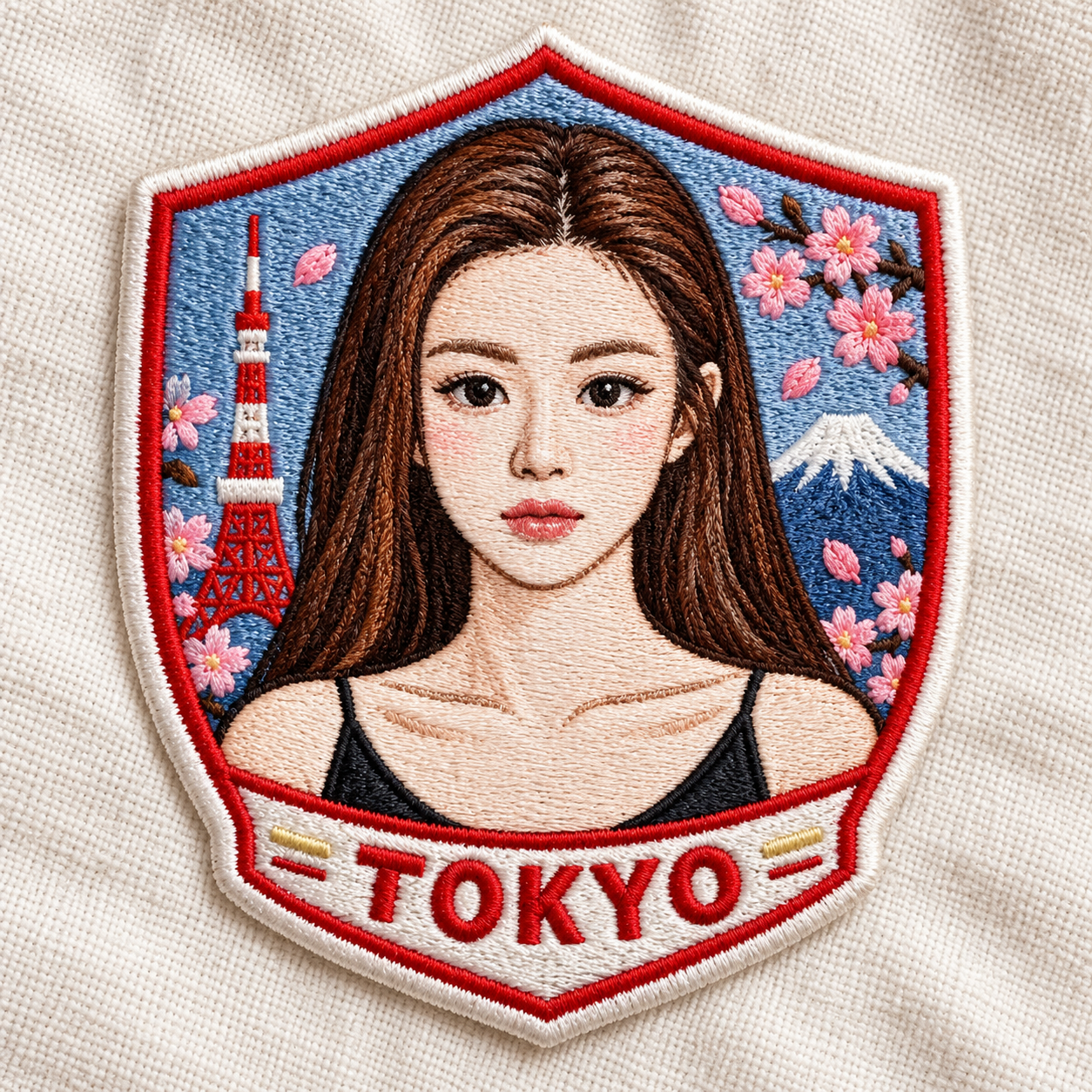
도시 테마 자수 패치 정사각형 제품 사진
Urban Embroidery Patch Square Product Photo
‘도시 테마 자수 패치 정사각형 제품 사진’은(는) gpt-image-2.5로 만든 작품입니다. OpenZhenZhen에서 원본 프롬프트와 생성 예시를 살펴보고 새로운 창작에 활용해 보세요.
프롬프트
중국어 프롬프트
创作一张近景、1:1正方形的刺绣贴片产品照片,贴片设计取材于提供的图像。将原图主要主体转化为干净、讨喜的卡通刺绣,同时保留其可辨认特征;若画面中有人物,其身份须与ref-10a-v1一致。贴片采用盾形轮廓,以丰富立体的线绣纹理和鲜明整洁的针脚呈现。通过边缘或少量装饰针线,融入日本东京国旗色彩的灵感点缀;不要将贴片变成完整旗帜。添加精确的大写刺绣文字“TOKYO”,可沿柔和弧线或直线排列。贴片放在柔和的米白色布料上,以自然光展现织物纹理、针脚和立体层次。最终画面保持正方形,不要添加其他字样或无关物体。
영어 프롬프트
Create a close-up square 1:1 product photograph of an embroidered patch inspired by the supplied image. Translate its main subject into a clean, charming cartoon-style embroidery while preserving recognizable defining features; if a person is visible, keep that person's identity consistent with ref-10a-v1. Use a shield-shaped patch silhouette, with rich dimensional thread texture and vibrant, neatly stitched colors. Represent Tokyo, Japan through small accents inspired by its national colors, such as the border or a few decorative stitches; do not turn the patch into a full flag. Add the exact uppercase embroidered lettering "TOKYO" along a gentle curve or straight baseline. Place the patch on soft off-white fabric and use natural light that reveals the weave, stitching and depth. Keep the final image square, with no extra lettering or unrelated objects.
더 많은 이미지·동영상 프롬프트 보기 · 이미지 생성 · 동영상 생성 · AI 캔버스에서 만들기
관련 작품
- 한국식 스윗쿨 성인 그림자 어긋남 기괴 패션 사진
‘한국식 스윗쿨 성인 그림자 어긋남 기괴 패션 사진’은(는) gpt-image-2.5로 만든 작품입니다. OpenZhenZhen에서 원본 프롬프트와 생성 예시를 살펴보고 새로운 창작에 활용해 보세요.
- 레몬 옐로 스포츠웨어 입은 성인 여성의 피클볼 CCD 라이프 화보
‘레몬 옐로 스포츠웨어 입은 성인 여성의 피클볼 CCD 라이프 화보’은(는) gpt-image-2.5로 만든 작품입니다. OpenZhenZhen에서 원본 프롬프트와 생성 예시를 살펴보고 새로운 창작에 활용해 보세요.
- 비 갠 후 가로등 아래 노란 오리 우비를 입은 두 사람의 야경 일러스트
‘비 갠 후 가로등 아래 노란 오리 우비를 입은 두 사람의 야경 일러스트’은(는) gpt-image-2.5로 만든 작품입니다. OpenZhenZhen에서 원본 프롬프트와 생성 예시를 살펴보고 새로운 창작에 활용해 보세요.
- 창가에서 독서하는 성인 여성의 따뜻한 실내 인물 사진
‘창가에서 독서하는 성인 여성의 따뜻한 실내 인물 사진’은(는) gpt-image-2.5로 만든 작품입니다. OpenZhenZhen에서 원본 프롬프트와 생성 예시를 살펴보고 새로운 창작에 활용해 보세요.
- 연필과 목탄으로 그린 미니어처 초현실 포스터: 중심선을 넘는 그림자
‘연필과 목탄으로 그린 미니어처 초현실 포스터: 중심선을 넘는 그림자’은(는) gpt-image-2.5로 만든 작품입니다. OpenZhenZhen에서 원본 프롬프트와 생성 예시를 살펴보고 새로운 창작에 활용해 보세요.
- 편의점 볼록거울에 비친 성인 여성의 9칸 라이프 콜라주
‘편의점 볼록거울에 비친 성인 여성의 9칸 라이프 콜라주’은(는) gpt-image-2.5로 만든 작품입니다. OpenZhenZhen에서 원본 프롬프트와 생성 예시를 살펴보고 새로운 창작에 활용해 보세요.