OpenZhenZhen AI 提示词画廊 · Claude Opus 5.5 · video
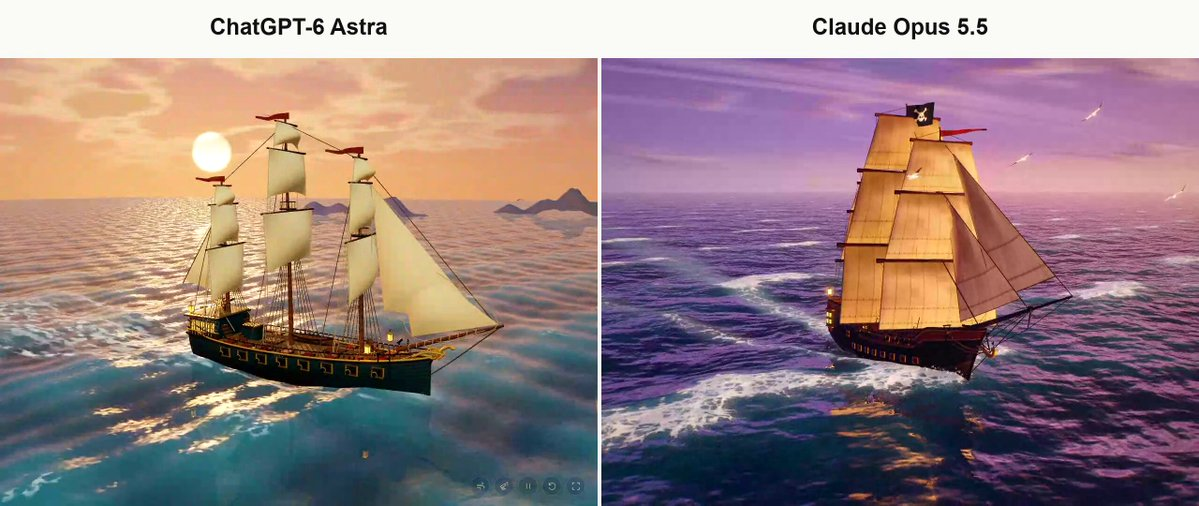
海盗船3D场景对比
Pirate Ship 3D Scene Comparison
用一份长篇详细提示词(明确禁止画面出现任何文字)做出一艘写实感十足、可交互的日落海盗船3D场景,并与Astra用同一提示词的结果做对比。
提示词 / Prompt
English prompt
Create from scratch a fully interactive 3D scene of a pirate ship sailing across a dynamic ocean at sunset. The visual style should be cinematic and stylized rather than photorealistic, while still being exceptionally rich, detailed, polished, and visually sophisticated. Build the ship, ocean, sky, lighting, materials, sails, rigging, cannons, small structural details, sea foam, wake, particles, animation, camera work, composition, atmospheric depth, and color grading. The final result should feel like a premium, high-production 3D artwork, not a prototype, technical demo, or low-quality scene. Start from a completely blank page. Do not reuse or depend on any previous project or scene. You may create the assets yourself or use reliable, trusted, open-source assets and libraries when necessary. Mandatory requirements: No text of any kind may appear anywhere inside the scene. No titles, names, logos, descriptions, credits, labels, or control instructions in any language. Deliver the entire project as one final standalone page file that can be opened directly in a web browser, with assets embedded inside it as much as reasonably possible. The ocean, ship, sails, and camera must all be animated naturally and smoothly. Avoid artificial slow motion or sluggish movement. The ship should feel like it is genuinely moving through the water. Do not rely on primitive geometric shapes as the finished result. Build a visually convincing and detailed pirate ship, including a carefully shaped hull, masts, sails, rigging, ropes, cannons, railings, lanterns, deck structures, and clearly visible small-scale details. Lighting must reveal the ship's geometry and materials clearly. Create a rich sunset atmosphere, deep ocean shading, reflections, convincing sea foam, and a detailed sailing wake behind and around the vessel. Maintain a strong balance between visual quality and real-time performance, preserving smooth interaction and animation without making an obvious sacrifice in quality. Automatically use the most appropriate skills, tools, libraries, techniques, and available assets needed to achieve the best result. Do not wait for me to specify which technologies to use. Actually test the finished result in a desktop web browser. Capture visual screenshots, inspect the browser console for errors, and fix every visible or technical issue you find, including distorted geometry, black screens, failed asset loading, broken animation, poor composition, rendering artifacts, or camera problems. At the end, verify that the final file opens and works directly, that the scene contains no text whatsoever, and that there are no remaining runtime or loading errors. Then finish the task with only a brief response.
主题与风格
探索更多图片和视频提示词 · 生成图片 · 生成视频 · 在 AI 画布中创作
相关作品
- Jelly world Arctic island: Opus vs Astra
The creator compared Claude Opus 5.5 and ChatGPT-6 Astra on the same detailed prompt to build an interactive Arctic diorama in a single HTML file with native WebGPU, preferring Opus's visuals and colors.
- OpenAI agent dots animation: Opus vs GPT-6.1
The creator compared GPT-6.1 Sol Max and Opus 5.5 by making a short animation explaining how OpenAI agents work, from a simple prompt that was not published.
- Animated website from a single image: Opus vs GPT-6.1
The creator compared Claude Opus 5.5 and GPT-6.1 Sol generating animated websites from a single image, using Higgsfield MCP access for the animation, noting Opus took longer but produced more detailed results. 原作需要参考素材;请自行准备图片、视频、音频、文档或代码库等输入。
- Jelly effect model comparison
Four AI models (Mistral Large v4, Kimi K3, GPT 6.1 Sol, Claude Opus 5.5) were each asked to recreate the famous jelly effect, with results compared in a video.
- Opus vs Astra diorama comparison (Blender)
原作需要参考素材;请自行准备图片、视频、音频、文档或代码库等输入。
- Pachinko effect: Opus 5.5 version
原作者未提供提示词,可直接把视频发给 Claude Opus/Sonnet 5.5 或者以上版本作为参考视频,可直接生成同样风格。