OpenZhenZhen AI 提示词画廊 · Claude Opus 5.5 · video
可交互3D彩绘玻璃木槿花
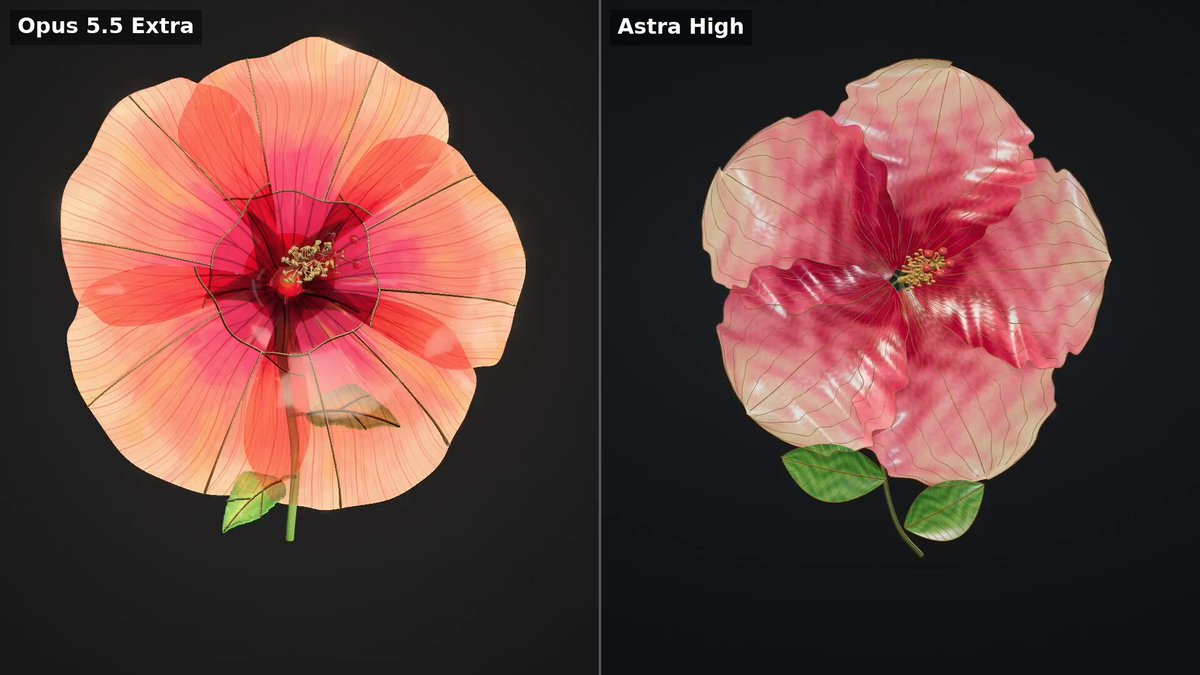
Interactive 3D Stained Glass Hibiscus
作者用Claude Opus 5.5根据一段详细提示和一张叶片参考图,制作了一个可在浏览器中交互的3D彩色玻璃木槺花作品,并与另一模型Astra High进行了对比。 原作需要参考素材;请自行准备图片、视频、音频、文档或代码库等输入。
提示词 / Prompt
English prompt
Create a beautiful, interactive 3D browser artwork of a single stained-glass hibiscus flower. Use the attached leaf as a reference for material delicacy, intricate veins, translucent colours and restrained presentation. Create an original flower composition. The flower is the entire experience. It fills most of the viewport against a quiet, near-black charcoal background. FLOWER Create five broad, organically shaped petals with gently ruffled edges, subtle asymmetry and graceful curvature. Arrange them into a convincing three-dimensional hibiscus, with natural overlap and a clearly visible centre. Each petal is made from thin, luminous stained glass. Blend ruby pink, coral, pale peach and honey amber within the glass, with delicate marbling and fine branching veins radiating from its base. Use extremely thin antique-gold seams and a finely beveled outer edge. Preserve the delicacy of the glass. Include a slender projecting central column with tiny golden anthers, a gracefully curved stem and two small translucent green leaves. MATERIAL AND LIGHT The glass must have visible thickness, coloured light transmission, subtle surface irregularities and crisp reflections that change with the viewing angle. Overlapping petals should remain readable. Balance illumination so the colours stay luminous and the veins remain visible throughout rotation. Avoid large white reflections that erase the detail. Use soft studio lighting with a warm backlight and a restrained rim light. Avoid excessive bloom, neon colour and heavy black outlines. MOVEMENT AND INTERACTION Start immediately with a flattering three-quarter view. Rotate slowly and smoothly so viewers can inspect the curved petals, thin edges and reverse side. Allow dragging to orbit, scrolling to zoom, and a small pause control. Keep the flower fully framed during automatic rotation. DELIVERY Build actual 3D geometry rendered in the browser. Generate the geometry and textures in code. Deliver a working preview and a downloadable, self-contained stained-glass-flower.html with all dependencies embedded. Run the result, inspect a full rotation, and fix missing surfaces, transparency problems, clipping or washed-out lighting before finishing. Prioritize the quality of the flower over interface decoration.
主题与风格
探索更多图片和视频提示词 · 生成图片 · 生成视频 · 在 AI 画布中创作
相关作品
- Jelly world Arctic island: Opus vs Astra
The creator compared Claude Opus 5.5 and ChatGPT-6 Astra on the same detailed prompt to build an interactive Arctic diorama in a single HTML file with native WebGPU, preferring Opus's visuals and colors.
- OpenAI agent dots animation: Opus vs GPT-6.1
The creator compared GPT-6.1 Sol Max and Opus 5.5 by making a short animation explaining how OpenAI agents work, from a simple prompt that was not published.
- Animated website from a single image: Opus vs GPT-6.1
The creator compared Claude Opus 5.5 and GPT-6.1 Sol generating animated websites from a single image, using Higgsfield MCP access for the animation, noting Opus took longer but produced more detailed results. 原作需要参考素材;请自行准备图片、视频、音频、文档或代码库等输入。
- Jelly effect model comparison
Four AI models (Mistral Large v4, Kimi K3, GPT 6.1 Sol, Claude Opus 5.5) were each asked to recreate the famous jelly effect, with results compared in a video.
- Opus vs Astra diorama comparison (Blender)
原作需要参考素材;请自行准备图片、视频、音频、文档或代码库等输入。
- Pachinko effect: Opus 5.5 version
原作者未提供提示词,可直接把视频发给 Claude Opus/Sonnet 5.5 或者以上版本作为参考视频,可直接生成同样风格。