OpenZhenZhen AI 提示词画廊 · Claude Opus 5.5 · video
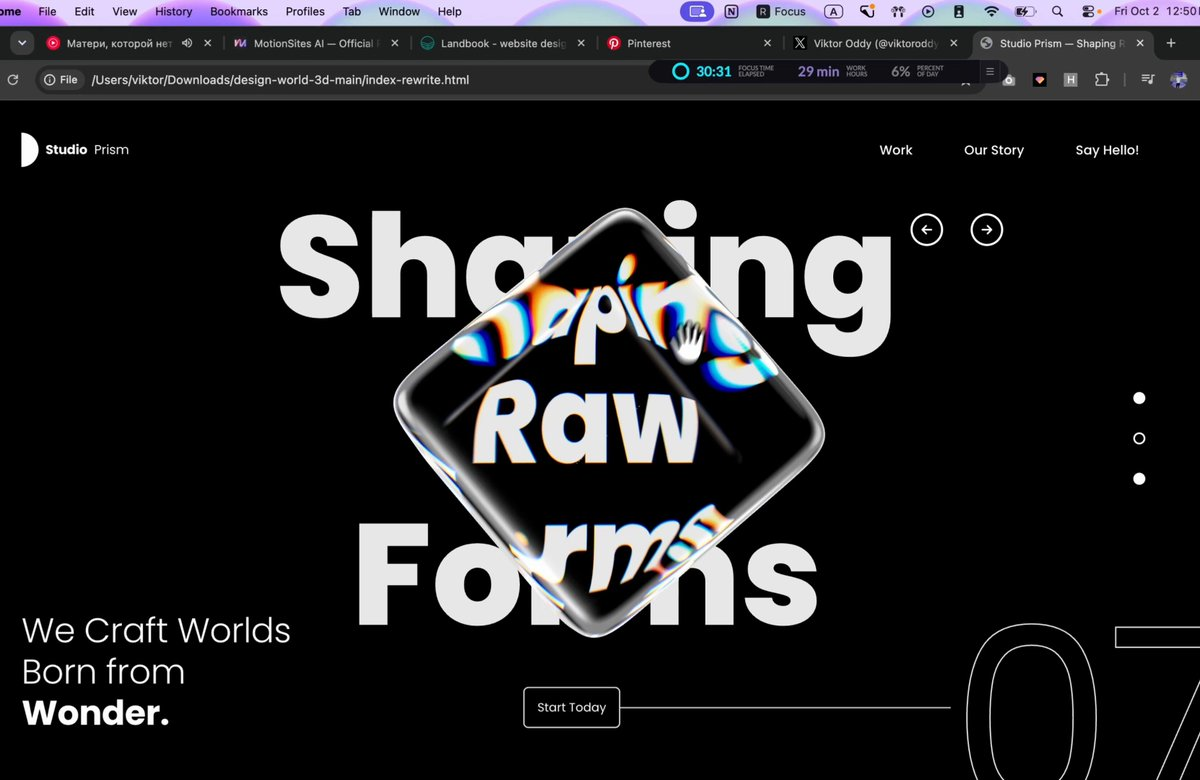
液态玻璃网页首屏
Liquid Glass Web Hero Section
作者称这是用 Opus 5.5 和一个提示词制作的液态玻璃 3D 首页区块,包含可旋转立方体和折射标题,没有使用 Spline 或 Blender。 原作需要参考素材;请自行准备图片、视频、音频、文档或代码库等输入。
提示词 / Prompt
English prompt
Build a single standalone index.html file (inline CSS + inline JS, no local assets, no build step) containing ONE full-screen hero section: a black "Design World" landing hero with a rotatable 3D glass cuboid in the centre that refracts a huge background headline with chromatic dispersion. Recreate it exactly to the spec below. ================================================== 1. EXTERNAL RESOURCES (use these exact URLs) ================================================== - Font: Google Fonts Poppins, weights 300/400/500/600/700/800 <link rel="preconnect" href="https://fonts.googleapis.com/"> <link rel="preconnect" href="https://fonts.gstatic.com/" crossorigin> <link href="https://fonts.googleapis.com/css2?family=Poppins:wght@300;400;500;600;700;800&display=swap" rel="stylesheet"> - Three.js r169 via importmap: "three": "https://cdn.jsdelivr.net/npm/[email protected]/build/three.module.js" "three/addons/": "https://cdn.jsdelivr.net/npm/[email protected]/examples/jsm/" Imports: GLTFLoader (loaders/GLTFLoader.js), mergeVertices + mergeGeometries (utils/BufferGeometryUtils.js), RoundedBoxGeometry (geometries/RoundedBoxGeometry.js). - 3D model (rounded cube GLB, CORS-enabled, load directly, do NOT download or replace): const MODEL_URL = 'https://d8j0ntlcm91z4.cloudfront.net/user_38xzZboKViGWJOttwIXH07lWA1P/hf_20260929_212926_92423081-b0e4-4f5a-b650-14af6c05c058.glb'; If it fails to load, fall back to new RoundedBoxGeometry(1, 1, 1, 8, 0.12). Page <title>: "Design World — Explore New Ideas". ================================================== 2. PAGE STRUCTURE (HTML) ================================================== <section class="hero" id="hero"> <canvas id="scene" aria-label="Rotatable glass cube. Drag to rotate."></canvas> <div class="ui"> <h1 class="sr-only">Explore New Ideas</h1> <header class="nav"> <a href="#" class="logo"><i class="logo-mark"></i><b>Design</b><span>World</span></a> <ul class="nav-links"><li><a>Home</a></li><li><a>Portfolio</a></li><li><a>Contact Us</a></li></ul> </header> <div class="arrows"> <button class="arrow" id="prev">[left-arrow SVG]</button> <button class="arrow" id="next">[right-arrow SVG]</button> </div> <nav class="dots"><button class="dot"></button><button class="dot active"></button><button class="dot"></button></nav> <p class="tagline">Let's Build the<br>Future of <strong>Design.</strong></p> <div class="cta-row"> <a href="#" class="cta">Explore Now</a> <span class="cta-line"></span> <span class="count" aria-hidden="true">07</span> </div> <div class="loader" id="loader">Loading model</div> </div> </section> Arrow SVGs: viewBox 0 0 24 24, fill none, stroke currentColor, stroke-width 2.6, round caps/joins. prev path: "M19 12H5M11 6l-6 6 6 6" next path: "M5 12h14M13 6l6 6-6 6" IMPORTANT: The big "Explore / New / Ideas" headline is NOT HTML text. It is drawn onto a 2D canvas inside WebGL so the glass cube can refract it (see section 4). The HTML only has a visually hidden <h1> for accessibility. ================================================== 3. CSS (exact values) ================================================== :root { --bg:#000; --fg:#fff; --pad-x: clamp(20px, 6.95vw, 120px) } html, body { height:100%; background:#000; color:#fff; font-family:'Poppins',sans-serif; -webkit-font-smoothing:antialiased } .hero { position:relative; width:100%; height:100vh; height:100svh; min-height:520px; overflow:hidden; background:#000 } #scene { position:absolute; inset:0; width:100%; height:100%; display:block; cursor:grab; touch-action:none } #scene.dragging { cursor:grabbing } .ui { position:absolute; inset:0; pointer-events:none; z-index:2 } /* drags pass through to the canvas */ .ui a, .ui button { pointer-events:auto } .sr-only { position:absolute; width:1px; height:1px; overflow:hidden; clip:rect(0 0 0 0); white-space:nowrap } NAV .nav { position:absolute; top:clamp(24px,4.7vh,40px); left:var(--pad-x); right:var(--pad-x); display:flex; align-items:center; justify-content:space-between } .logo { display:flex; align-items:center; gap:8px; color:#fff; text-decoration:none; font-size:15px; letter-spacing:-0.01em } .logo-mark { width:20px; height:40px; background:#fff; border-radius:0 20px 20px 0 } /* white "D" half-circle */ .logo b { font-weight:700 } .logo span { font-weight:400 } .nav-links { display:flex; gap:clamp(20px,4.1vw,60px); list-style:none } .nav-links a { color:#fff; text-decoration:none; font-size:15px; font-weight:500; position:relative } .nav-links a::after { content:''; position:absolute; left:0; right:0; bottom:-4px; height:1px; background:currentColor; transform:scaleX(0); transform-origin:right; transition:transform .35s ease } .nav-links a:hover::after { transform:scaleX(1); transform-origin:left } ARROWS (top-right, left of the dots column) .arrows { position:absolute; top:18.9%; left:76.7%; display:flex; gap:32px; transform:translate(-19px,-50%) } .arrow { width:38px; height:38px; border-radius:50%; border:2.5px solid #fff; background:transparent; color:#fff; display:grid; place-items:center; cursor:pointer; transition:background .25s, color .25s } .arrow svg { width:18px; height:18px } .arrow:hover { background:#fff; color:#000 } PAGINATION DOTS (vertical, right edge) .dots { position:absolute; right:calc(var(--pad-x) - 7px); top:49.4%; transform:translateY(-50%); display:flex; flex-direction:column; gap:33px } .dot { width:14px; height:14px; border-radius:50%; border:2px solid #fff; background:#fff; cursor:pointer; transition:background .25s } .dot.active { background:transparent } /* active = hollow ring, middle one active by default */ TAGLINE (bottom-left) .tagline { position:absolute; left:var(--pad-x); bottom:clamp(40px,7.5vh,70px); font-size:clamp(24px,2.65vw,44px); line-height:1.2; font-weight:300; letter-spacing:-0.01em } .tagline strong { font-weight:700; display:block } CTA ROW (button → horizontal line → giant outlined "07" bleeding off the right edge) .cta-row { position:absolute; left:45.6%; right:-1vw; top:88.7%; transform:translateY(-50%); display:flex; align-items:center } .cta { flex:none; padding:0 15px; height:48px; display:inline-flex; align-items:center; border:1.5px solid rgba(255,255,255,.85); border-radius:6px; background:rgba(0,0,0,.15); color:#fff; font-size:14px; font-weight:400; text-decoration:none; cursor:pointer; transition:background .25s, color .25s } .cta:hover { background:#fff; color:#000 } .cta-line { flex:1; height:1.5px; background:rgba(255,255,255,.8); min-width:40px } .count { flex:none; font-size:clamp(140px,19.8vw,360px); font-weight:400; line-height:1; letter-spacing:-0.02em; color:transparent; -webkit-text-stroke:1.5px rgba(255,255,255,.9); transform:translateY(6%); user-select:none } LOADER .loader { position:absolute; left:50%; top:50%; transform:translate(-50%,-50%); font-size:12px; letter-spacing:.2em; text-transform:uppercase; opacity:.6; transition:opacity .6s } .loader.done { opacity:0 } RESPONSIVE @media (max-width:900px), (max-aspect-ratio:1/1) { .arrows { left:auto; right:var(--pad-x); top:15%; transform:translateY(-50%); gap:14px } .tagline { bottom:clamp(150px,20vh,220px) } .cta-row { left:var(--pad-x); right:-3vw; top:auto; bottom:24px; transform:none } .count { font-size:clamp(120px,22vw,200px) } } @media (max-width:640px) { .nav-links { gap:16px } .nav-links a, .logo { font-size:13px } .dots { gap:20px; right:16px } .dot { width:10px; height:10px } .cta-row { right:-8vw } .count { font-size:120px } } @media (max-width:420px) { .nav-links li:nth-child(2) { display:none } } /* hide "Portfolio" */ No horizontal page scroll at any width. ================================================== 4. WEBGL SCENE (Three.js) ================================================== Renderer: WebGLRenderer({ canvas:#scene, antialias:true, alpha:false }), clearColor #000, outputColorSpace SRGBColorSpace, pixelRatio = min(devicePixelRatio, 2). Camera: PerspectiveCamera(fov 30, aspect W/H, 0.1, 100) at (0,0,10) looking at origin. 4a. Background headline (drawn into an offscreen 2D canvas → CanvasTexture) - Canvas size = viewport × DPR, filled #000. - mobile = (W < 768) || (W/H < 1). - fontSize fs = min(H*0.21, W*(mobile ? 0.21 : 0.118)); font = `800 ${fs}px Poppins`. If the widest line is wider than W*(mobile ? 0.9 : 0.5), scale fs down to fit. - Lines: "Explore", "New", "Ideas". Fill #e9e9e9, textAlign center, baseline alphabetic. - Centre x = W*(mobile ? 0.5 : 0.505); centre y = H*(mobile ? 0.45 : 0.468). Line gap = fs*1.07; cap height ≈ fs*0.7. Line i (0..2) baseline y = cy + cap/2 + (i-1)*gap. - Texture: colorSpace SRGB, LinearFilter, no mipmaps. Redraw on resize and on document.fonts 'loadingdone'. - Show it with a fullscreen quad (PlaneGeometry(2,2), ShaderMaterial, vertex outputs position.xy directly, fragment = texture2D(uTex, vUv) followed by #include <colorspace_fragment> ON ITS OWN LINE; depthTest/depthWrite false; frustumCulled false) in its own bgScene. - Wait for fonts before first draw: Promise.race([Promise.all([document.fonts.load('800 100px Poppins'), document.fonts.ready]), 2500ms timeout]) then layout() + start loop. 4b. Model loading - GLTFLoader.load(MODEL_URL). Traverse gltf.scene; for each mesh: clone geometry, delete 'uv','color','tangent' attributes, mergeVertices(g, 1e-4), computeVertexNormals(), applyMatrix4(mesh.matrixWorld). Merge all parts with mergeGeometries. - Centre the geometry on its bounding box and scale uniformly so its largest dimension = 1. - Scene graph: scene → pivot (screen position + scale) → spinner (rotation) → cube mesh. On load add class "done" to #loader. 4c. Cube placement (in layout(), on load and on resize) - visH = 2*tan(fov/2)*10; visW = visH*aspect. - Screen-fraction centre: sx = mobile ? 0.5 : 0.517, sy = mobile ? 0.45 : 0.488. pivot.position = ((sx-0.5)*visW, (0.5-sy)*visH, 0). - On-screen edge length px = min(H*0.44, W*(mobile ? 0.45 : 0.29)); pivot.scale = (px/H)*visH. - Initial spinner rotation: Euler(-0.42, 0.62, 0.18). 4d. Glass material — custom ShaderMaterial, screen-space refraction with 6-band chromatic dispersion, rendered in two passes (back faces, then front faces). Vertex shader: varying vec3 vNormal; varying vec3 vEye; worldPos = modelMatrix*position; mvPos = viewMatrix*worldPos; gl_Position = projectionMatrix*mvPos; vNormal = normalize(normalMatrix*normal); vEye = normalize(https://mvpos.xyz/); Fragment shader: uv = gl_FragCoord.xy / uResolution (drawing-buffer size). n = normalize(vNormal); if (uBackside > 0.5) n = -n; // do NOT use gl_FrontFacing, three.js flips winding for BackSide eye = normalize(vEye). LOOP = 16 iterations; slide = i/LOOP * 0.045. For each band compute refract(eye, n, 1.0/ior) with iorR/Y/G/C/B/P and sample uTexture at uv + refr.xy * (uRefractPower + slide*k) * uChromatic, with k = 1 (R), 1 (Y), 2 (G), 2.5 (C), 3 (B), 1 (P): r = tex(R).x*0.5 y = (tex(Y).x*2 + tex(Y).y*2 - tex(Y).z)/6 g = tex(G).y*0.5 c = (tex(C).y*2 + tex(C).z*2 - tex(C).x)/6 b = tex(B).z*0.5 p = (tex(P).z*2 + tex(P).x*2 - tex(P).y)/6 R = r + (2p + 2y - c)/3; G = g + (2y + 2c - p)/3; B = b + (2c + 2p - y)/3 color += vec3(R,G,B) color /= LOOP; saturation adjust: mix(luma(color), color, uSaturation) with luma weights (0.2125, 0.7154, 0.0721). Specular (Blinn-Phong, light vector = normalize(-light), view = -eye): spec = specular(uLight, uShininess, uDiffuseness) + 0.6 * specular(vec3(1,1,-1), uShininess*0.6, uDiffuseness*0.5) spec(x) = pow(max(dot(n,halfVec),0), shininess) + max(0,dot(n,lightVec))*diffuseness color += spec * (backside ? 0.35 : 1.0) Fresnel: f = pow(1.0 + dot(eye, n), uFresnelPower); color = mix(color, vec3(1), f * (backside ? 0.25 : 0.55)). color += vec3(0.004, 0.005, 0.007). gl_FragColor = vec4(color,1); then #include <colorspace_fragment> on its own line. Uniform values: uIorR 1.15, uIorY 1.16, uIorG 1.18, uIorC 1.22, uIorB 1.22, uIorP 1.22, uRefractPower 0.30 (front) / 0.22 (back), uChromatic 0.5, uSaturation 1.08, uShininess 90, uDiffuseness 0.02, uFresnelPower 5.0, uLight (-1, 1, 1), uBackside 0 (frontMat, side FrontSide) / 1 (backMat, side BackSide). 4e. Render pipeline (every frame) - Two WebGLRenderTargets sized to drawing buffer (W*DPR × H*DPR), type HalfFloatType, default (linear) colour space: rtBack, rtFront. - backMat.uTexture = rtBack.texture; frontMat.uTexture = rtFront.texture. 1) render bgScene → rtBack 2) render bgScene → rtFront, then (autoClear=false) cube with backMat → rtFront 3) render bgScene → screen, then (autoClear=false, clearDepth) cube with frontMat → screen - This gives the look: text seen through the cube is magnified, mirrored and split into blue/yellow fringes, inner rounded edges of the cube are faintly visible, and the bevelled edges glow white. ================================================== 5. INTERACTION & ANIMATION ================================================== - Drag to rotate (pointer events on the canvas, setPointerCapture): dx = Δx*0.008, dy = Δy*0.008; apply as world-space rotation: premultiply spinner.quaternion by axisAngle(Y, dx) then axisAngle(X, dy). Track velocity per 16.67ms frame; add class "dragging" to the canvas while dragging. - Inertia after release: keep applying velocity, damped by 0.94^(dt*60) per frame. - Idle drift: 0.6s after release, blend in a constant slow rotation of 0.0035 rad/frame around Y and 0.0012 rad/frame around X (blend ramps 0→1 over 1s). It also runs from page load. - Prev/Next arrow buttons: smoothly rotate the cube -90°/+90° around Y (ease: each frame apply remaining*min(1, 0.09*dt*60) until remaining < 0.0005). Cancels inertia; dragging cancels the spin. - Dots: clicking a dot makes it the only .active one (hollow ring). - Hover transitions: nav link underline wipe (.35s), arrow and CTA buttons invert to white bg / black content (.25s). - Clamp frame dt to 0.05s. Recompute layout (renderer size, camera aspect, render-target sizes, uResolution, headline canvas, cube position/scale) on window resize. ================================================== 6. LAYOUT REFERENCE (desktop 1440×806) ================================================== - Logo at (100, 38), 40px tall. Nav links right-aligned, right edge ≈ 1340, vertical centre ≈ 58. - Arrow circles centred at ≈ (1105, 152) and (1175, 152). - Dots at x ≈ 1340, y ≈ 351 / 398 / 445 (middle one hollow). - Headline "Explore / New / Ideas" centred at x ≈ 727, ~170px ExtraBold, baselines ≈ 272 / 445 / 637. - Glass cube occupies ≈ x 510–1000, y 145–600, slightly right of centre, overlapping the headline. - Tagline "Let's Build the / Future of / Design." at left 100, bottom ≈ 60px, ~38px, Light with Bold "Design.". - "Explore Now" button at (657, 691), 48px tall; a 1.5px line runs right to a huge outlined "07" whose "0" starts at x ≈ 1140 and whose "7" is clipped by the right and bottom edges. - Pure black background, all UI white. Mobile (≤767px or portrait): headline and cube centred at 50% x / 45% y, headline up to 90% width, arrows move under the nav on the right, tagline sits above the CTA row, and the CTA row is pinned 24px from the bottom with "07" partly off-screen on the right. Output: one complete index.html, nothing else.
主题与风格
探索更多图片和视频提示词 · 生成图片 · 生成视频 · 在 AI 画布中创作
相关作品
- BlitzClean Mac utility demo video
BlitzClean is a free, open-source Mac menu bar app for monitoring RAM/CPU and cleaning disk space, with its demo video made using Opus 5.5.
- Sponsorship promo video cut via MCP tools
A sponsorship promo video rendered in 25 minutes by Claude Opus 5.5, which was given access to Riverside MCP, Magnific MCP, YouTube Studio and the team's design system, with minimal direction. 原作需要参考素材;请自行准备图片、视频、音频、文档或代码库等输入。
- Account introduction video from pinned tweet info
原作需要参考素材;请自行准备图片、视频、音频、文档或代码库等输入。
- App visual built from a single icon asset
原作需要参考素材;请自行准备图片、视频、音频、文档或代码库等输入。
- Semantic Slack search tool
原作需要参考素材;请自行准备图片、视频、音频、文档或代码库等输入。
- Foreign drama series intro video
原作者未提供提示词,可直接把视频发给 Claude Opus/Sonnet 5.5 或者以上版本作为参考视频,可直接生成同样风格。