Галерея ИИ-промптов OpenZhenZhen · MiniMax H3 · video
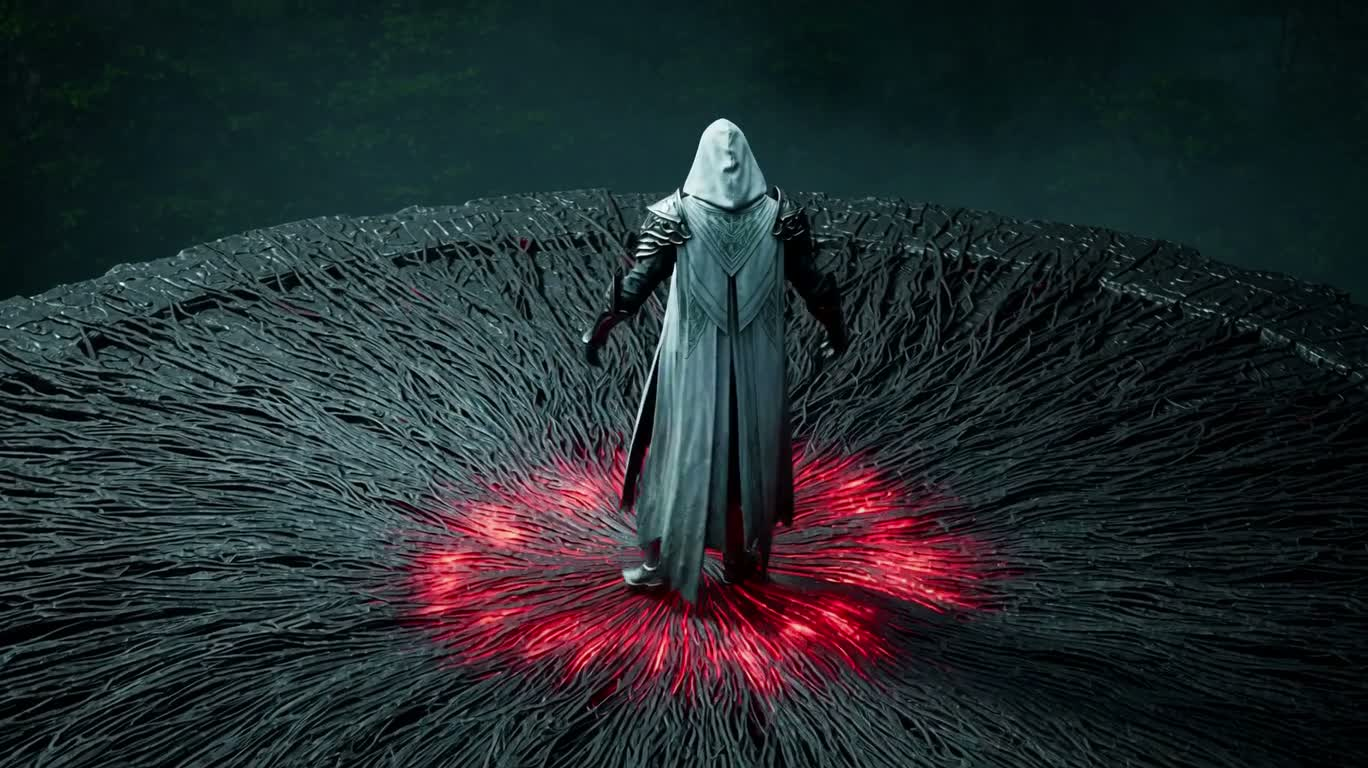
Прохождение сквозь ядро Наблюдателя
The Watcher's Core Passage
«Прохождение сквозь ядро Наблюдателя» — работа с использованием MiniMax H3 на OpenZhenZhen. Изучите исходный промпт и пример генерации для собственных проектов.
Промпт
Промпт на китайском
制作一段电影感、写实奇幻风格的16:9视频,时长严格15秒,使用硬切但以画面元素遮挡衔接;画面无文字、HUD、界面、标志或音乐。单一披兜帽的守望者身穿长款浅色层叠长袍与华丽铠甲,完成分层解体并高速穿越。 镜头1,0.0–1.5秒:略高机位从后方跟拍,守望者重重踏上黑色玄武岩花瓣状平台,脚下深红能量沟槽点燃。他张开双臂,一根升起的黑色肋骨扫过镜头完成转场。 镜头2,1.5–5.5秒:对称正面全身视角,镜头缓慢推进,身后平台肋条旋转。铠甲按清晰层次分解:头盔和肩部的硬质外壳板先抬起,随后蚀解成粗糙黑色金属碎片,露出完整镜银色身体;银色层沿胸部、手臂和大腿裂成反光液态金属带,显露紫蓝纤维能量骨架,以及胸骨、肩部、骨盆和膝部的玫瑰金环形机构;纤维分离成发光丝线,环形机构旋转一周。碎片、金属带和纤维以不同速度上升,形成纵深。最后丝线向上抽离,留下平滑的乳白能量轮廓,并以完整白闪结束。身体比例和张臂姿态始终对齐;这是由外壳到核心的分层解体,不是均匀的尘化消散。 镜头3,5.5–8.8秒:闪切至极低角度,白紫核心从平台垂直爆发升空。尾迹保持分层:外圈稀疏黑色碎片,中层银色带,内圈环绕明亮核心的紫金丝线。镜头从下方和后方加速穿过蓝灰雾气并翻滚,直到运动方向指向画面右侧。 镜头4,8.8–13.4秒:按运动方向切入潮湿森林峡谷。紧贴侧后方跟拍同一分层核心从左向右飞驰。外层黑色碎片、中层银色带和内层金紫丝线保持清晰分离,湿润峭壁、树根与树木以边缘视差快速掠过。最后一秒核心陡然向下俯冲并扩大,白光几乎充满画面。 镜头5,13.4–15.0秒:陡峭俯视角,核心撞入圆形石盆。一次橙白闪光将火花、黑石、锈红尘土和短促发光裂纹向外抛散。能量塌缩时,完全相同的守望者已以低位三点蹲姿出现在盆中。镜头震动一次后稳定并停留在落点。 色彩推进:冷青色起源、白银层、紫蓝纤维、玫瑰金机构、白紫核心与锈橙冲击。保持一个守望者、一个投射体和一个撞击点,维持连贯电影光照与真实材质细节。
Промпт на английском
Create a cinematic photorealistic fantasy sequence in 16:9, exactly 15 seconds, with hard concealed cuts and no text, HUD, interface, logos, or music. A single hooded Warden in a long pale layered robe and ornate armor performs a nested disassembly and fast-travel launch. Shot 1, 0.0–1.5s: Slightly elevated rear-following camera as the Warden takes one heavy step onto a dark basalt iris platform. Crimson channels ignite beneath him. He opens his arms. A rising black rib sweeps across the lens as the transition. Shot 2, 1.5–5.5s: Symmetrical frontal full-body view with a controlled push-in while the platform ribs rotate behind him. The armor separates in readable stages: rigid outer shell plates lift from helmet and shoulders and erode into coarse black metallic flakes, revealing a complete mirror-silver body; the silver layer opens into reflective liquid-metal ribbons along chest, arms, and thighs, revealing a purple-blue fibrous energy lattice with rotating rose-gold circular mechanisms at the sternum, shoulders, pelvis, and knees; the fibers separate into luminous strands while the rings rotate once. Fragments, ribbons, and fibers rise at different speeds for depth. The strands pull upward into a smooth pale-white energy silhouette, ending in a full white flash. Keep the body proportions and arms-out alignment consistent; this is layered shell-to-core disassembly, not a uniform dust dissolve. Shot 3, 5.5–8.8s: Flash cut to an extreme low angle as the white-violet core erupts vertically from the platform. Its trail preserves the layers: sparse black fragments outside, silver ribbons in the middle, purple-gold filaments around the bright core. The camera accelerates beneath and behind it through blue-gray fog, rolling until the motion points screen right. Shot 4, 8.8–13.4s: Direction-matched cut into a wet forest gorge. Tight side-rear tracking follows the same layered core racing left to right. Outer black fragments, middle silver ribbons, and inner gold-violet filaments remain visibly separated while cliffs, roots, and trees streak past in edge parallax. During the final second it banks steeply downward and expands until white light nearly fills the frame. Shot 5, 13.4–15.0s: Steep overhead view as the core strikes a circular stone basin. One orange-white flash throws sparks, black stone, rust-red dust, and short glowing cracks outward. As the energy collapses, the identical Warden is already present in a low three-point crouch. The camera jolts once, stabilizes, and holds on the landing. Color progression: cold cyan origin, white-silver layers, purple-blue fibers, rose-gold mechanisms, white-violet core, and rust-orange impact. Maintain one Warden, one projectile, and one impact point with coherent cinematic lighting and realistic material detail.
Темы и стили
Больше промптов для изображений и видео · Создать изображение · Создать видео · Создать на ИИ-холсте
Похожие работы
- Парящая деревня на гигантской птице над морем облаков
«Парящая деревня на гигантской птице над морем облаков» — работа с использованием MiniMax H3 на OpenZhenZhen. Изучите исходный промпт и пример генерации для собственных проектов.
- Огни костров в снежной степи и буря у золотого дворца
«Огни костров в снежной степи и буря у золотого дворца» — работа с использованием MiniMax H3 на OpenZhenZhen. Изучите исходный промпт и пример генерации для собственных проектов.
- Дракон в лесу
«Дракон в лесу» — работа с использованием MiniMax H3 на OpenZhenZhen. Изучите исходный промпт и пример генерации для собственных проектов.
- Багровый силуэт на краю бури
«Багровый силуэт на краю бури» — работа с использованием MiniMax H3 на OpenZhenZhen. Изучите исходный промпт и пример генерации для собственных проектов.
- Открытие портала в волшебном лесу
«Открытие портала в волшебном лесу» — работа с использованием MiniMax H3 на OpenZhenZhen. Изучите исходный промпт и пример генерации для собственных проектов.
- Осенние листья возвращаются на ветви против времени
«Осенние листья возвращаются на ветви против времени» — работа с использованием MiniMax H3 на OpenZhenZhen. Изучите исходный промпт и пример генерации для собственных проектов.