Галерея ИИ-промптов OpenZhenZhen · MiniMax H3 · video
Фотоаппарат между светом и тенью
Camera Between Light and Shadow
«Фотоаппарат между светом и тенью» — работа с использованием MiniMax H3 на OpenZhenZhen. Изучите исходный промпт и пример генерации для собственных проектов.
Промпт
Промпт на китайском
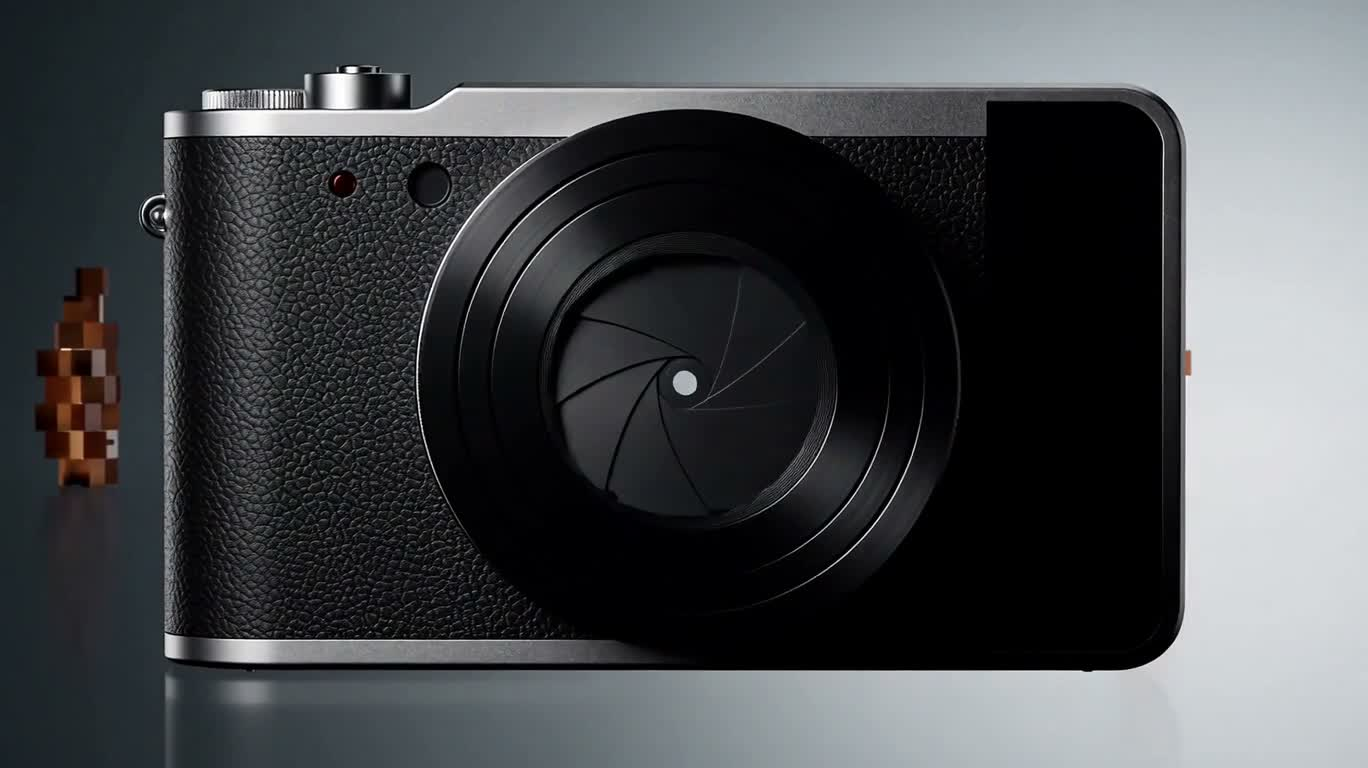
制作一支15秒、16:9、30fps的高端便携相机概念广告,围绕同一台无品牌相机展开,并始终保持产品外观一致:横向圆角机身,左侧大型镜头,右侧窄幅纯黑显示区,银色喷砂铝框、带细纹理的黑色机身、顶部齐平快门键、正面极小的暗红状态点,以及精密接缝。镜头由六片深灰光圈叶片、拉丝黑色环和深墨色多层玻璃组成,仅呈现克制的冷白与蓝灰反光。不要出现标志、文字、数字或参数。采用精致的工业设计广告质感、简洁留白的构图与精准运镜;主光来自左上方,右后方设置轮廓光,正前方加入竖向柔光反射。背景在黑色、冷灰色与暖白色之间转换。 0–1.7秒:从镜头内部的极限微距开始。六片光圈叶片同步向外旋转,中央开口从冷白光点逐渐扩大。沿光轴快速后拉,展现真实的镜头内部纵深。 1.7–3.5秒:继续后撤并向右弧形移动。掠过的边缘光逐渐显露相机机身。 3.5–5.3秒:推进镜头中心,转入暖白摄影棚中的取景器画面。一片象牙白羽毛悬浮在深石墨灰与暖白的交界处。画面中只出现四角标记、空心对焦框、细水平线和极小的暗红点;不要文字或数字。对焦框收缩并锁定羽毛。 5.3–7.0秒:触发快门,但不闪白。光圈快速闭合,取景器画面收缩成一张矩形影像卡片。随后依次出现另外三张极简静物卡片:暖白台面上的黑色火山岩、弯曲的银色金属薄片,以及冷灰水面上的圆形波纹。四张卡片漂浮在暖白空间中,不旋转、不变形。 7.0–9.2秒:将卡片排成横向序列。摄影机以低机位从左向右快速掠过前三张卡片,近处边缘出现方向性模糊,远处形成视差,随后在水面卡片前精准减速停稳。 9.2–11.4秒:水面卡片开始放大并泛起涟漪。摄影机加速穿入,直至水面铺满画面,再贴近水面滑行,呈现向外扩散的同心波纹。中央高光逐渐呈现相机镜头的形状。 11.4–13.2秒:靠近水面中央的深色圆形倒影。倒影铺满画面时,以圆形形状匹配切回相机前组镜头玻璃,随后拉远并向左上方环绕,显露整台相机。 13.2–15.0秒:相机以左前方四分之三角度悬浮于暖白摄影棚中。摄影机向上环绕并轻柔推进,展示机身表面,随后减速并稳定在产品展示构图。一道冷白高光扫过机身,极小的暗红状态点亮起一次。最后0.6秒完全静止,不加标题卡,直接结束。 以镜头、影像卡片、水面波纹和产品镜头之间的形状与位置匹配来衔接场景。不要硬切、闪白、液体变形、额外物件、人物、风景、彩虹炫光、霓虹、赛博朋克风格或廉价塑料质感;不要拍立得边框,也不要让卡片消失、重复、穿透、旋转或变形。声音不作设定。
Промпт на английском
Create a 15-second, 16:9, 30fps premium concept advertisement for one unbranded compact camera. Keep its design consistent throughout: a horizontal rounded body with a large lens on the left, a narrow plain black display area on the right, a silver sandblasted aluminum frame, finely textured black body, flush top shutter button, tiny dark red status dot, and precise seams. The lens has six dark gray aperture blades, brushed black rings, and deep charcoal layered glass, with only restrained cool white and blue-gray reflections. No logos, words, numbers, or specifications. Use polished industrial-design advertising, uncluttered compositions, precise camera moves, soft key light from upper left, a rim light from rear right, and a vertical soft reflection from the front. Backgrounds shift between black, cool gray, and warm white. 0–1.7s: Extreme macro inside the lens. Six aperture blades rotate outward together as the central opening grows from a cool white point. Pull rapidly back along the optical axis, revealing realistic depth inside the lens. 1.7–3.5s: Continue pulling back and arc to the right. A traveling edge light reveals the camera body. 3.5–5.3s: Push into the lens center and transition to a warm-white studio viewfinder composition. An ivory feather floats across the boundary between dark graphite and warm white. Show only four corner marks, an empty focus bracket, a thin horizontal line, and a tiny dark red dot; no text or numbers. The focus bracket contracts and locks onto the feather. 5.3–7.0s: Trigger the shutter without a flash. The aperture closes quickly and the viewfinder image contracts into a rectangular image card. Three more minimalist still-life cards appear in sequence: a black volcanic rock on a warm-white surface, a curved silver metal sheet, and circular ripples on cool gray water. Keep all four cards floating in warm-white space, without card rotation or distortion. 7.0–9.2s: Arrange the cards in a horizontal row. A low camera move travels quickly from left to right past the first three cards, with directional blur on near edges and parallax in the distance, then brakes precisely in front of the water card. 9.2–11.4s: Enlarge the water card as ripples form. Accelerate through it until the water fills the frame, then glide close across the surface as concentric ripples spread outward. The central highlight gradually takes on the shape of the camera lens. 11.4–13.2s: Move toward the dark circular reflection at the water’s center. At full frame, match its circular shape to the camera’s front lens glass, then pull back and orbit toward the upper left to reveal the complete camera. 13.2–15.0s: The camera floats at a front-left three-quarter angle in a warm-white studio. Move upward around it and gently push in to show its surfaces, then slow and settle into a steady product view. A cool white highlight sweeps across the body and the tiny dark red status dot glows once. Hold completely still for the final 0.6 seconds and end without a title card. Connect scenes with shape and position matches between the lens, image cards, water ripples, and product lens. No hard cuts, white flashes, liquid morphing, extra objects, people, landscapes, rainbow flares, neon, cyberpunk styling, cheap plastic appearance, instant-film borders, or disappearing, duplicated, penetrating, rotating, or distorted cards. Audio is not specified.
Темы и стили
Больше промптов для изображений и видео · Создать изображение · Создать видео · Создать на ИИ-холсте
Похожие работы
- Кибербитва: демонстрация подсветки полного набора киберспортивного снаряжения
«Кибербитва: демонстрация подсветки полного набора киберспортивного снаряжения» — работа с использованием MiniMax H3 на OpenZhenZhen. Изучите исходный промпт и пример генерации для собственных проектов.
- Неоновый Багдад 2090: Глаза надежды
«Неоновый Багдад 2090: Глаза надежды» — работа с использованием MiniMax H3 на OpenZhenZhen. Изучите исходный промпт и пример генерации для собственных проектов.
- Неоновая дождливая ночь, путь к лунному свету
«Неоновая дождливая ночь, путь к лунному свету» — работа с использованием MiniMax H3 на OpenZhenZhen. Изучите исходный промпт и пример генерации для собственных проектов.
- Неоновая рисованная банка энергии
«Неоновая рисованная банка энергии» — работа с использованием MiniMax H3 на OpenZhenZhen. Изучите исходный промпт и пример генерации для собственных проектов.
- Реклама футуристических высоких кроссовок с самозашнуровыванием
«Реклама футуристических высоких кроссовок с самозашнуровыванием» — работа с использованием MiniMax H3 на OpenZhenZhen. Изучите исходный промпт и пример генерации для собственных проектов.
- Неоновый город будущего
«Неоновый город будущего» — работа с использованием MiniMax H3 на OpenZhenZhen. Изучите исходный промпт и пример генерации для собственных проектов.