Thư viện prompt AI OpenZhenZhen · Claude Opus 5.5 · video
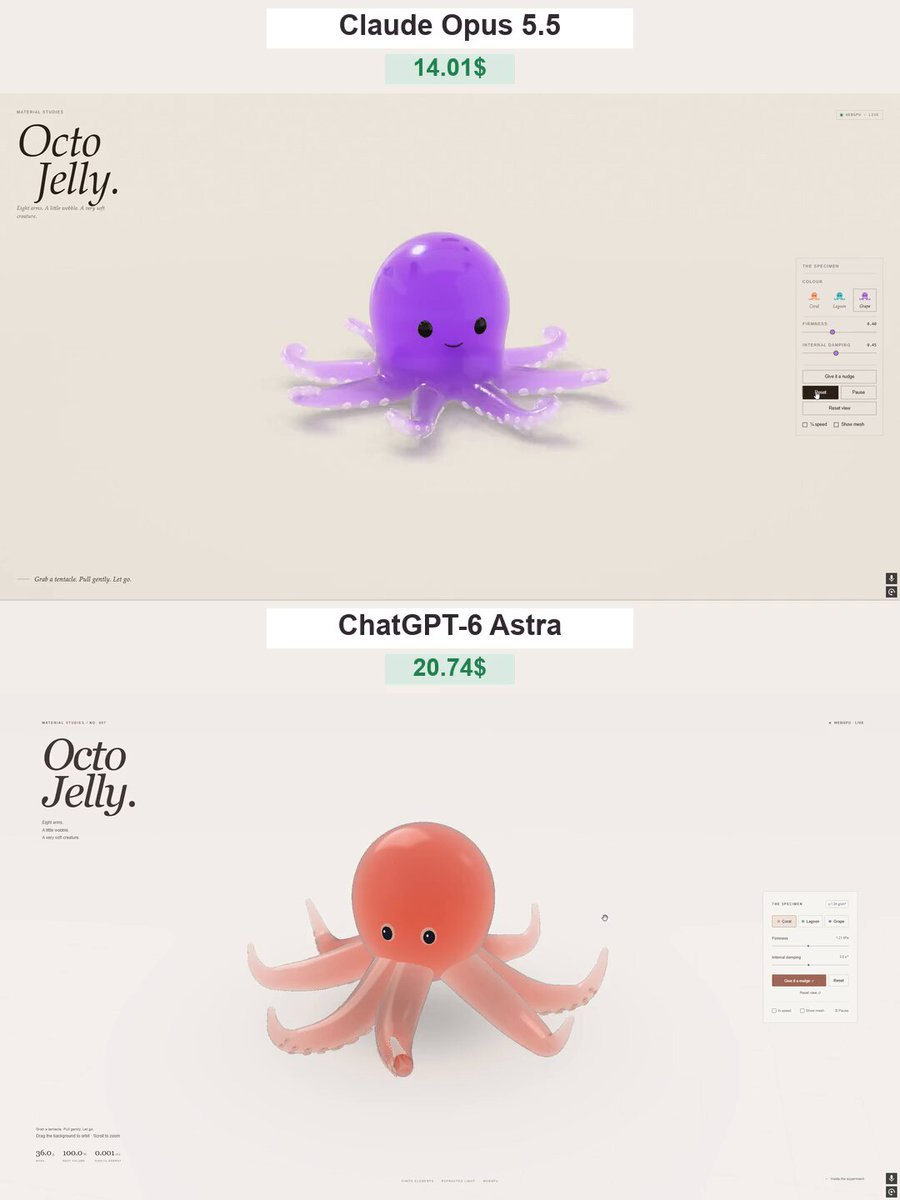
So sánh hiệu ứng vật lý bạch tuộc kẹo dẻo
Gummy Octopus Physics Comparison
So sánh hiệu ứng vật lý bạch tuộc kẹo dẻo — khám phá tác phẩm được tạo bằng Claude Opus 5.5 trên OpenZhenZhen, kèm prompt gốc và ví dụ tạo nội dung để tham khảo.
Prompt
Prompt tiếng Anh
Create “Octo Jelly” - a beautiful, interactive 3D gummy octopus that users can grab, stretch, and squish directly in their browser. Deliver a complete single-file HTML experience using genuine WebGPU. ART DIRECTION Make the octopus look like a premium translucent gummy candy: a rounded head, eight curled tentacles, small suction cups, and a cute, understated face. Use a warm off-white background, soft studio lighting, and a subtle ground shadow. Keep the scene elegant and uncluttered, with the octopus large and centered. GEOMETRY AND MATERIAL * Generate all geometry procedurally. No external models or image files. * Connect all eight tentacles smoothly to the body, without visible gaps or floating parts. * Add rounded suction cups that stay attached as the tentacles deform. * Use glossy, translucent jelly with thickness-dependent color absorption, refraction, soft internal light scattering, and delicate rim highlights. * Thick areas should have richer color; thin tentacle tips should transmit more light. * Avoid opaque plastic, blown-out highlights, and visible mesh seams. SOFT-BODY PHYSICS Use a stable mass-spring or position-based dynamics system with elastic constraints and approximate volume preservation. * The head should feel soft but substantial. * Tentacles should be more flexible than the head, especially near their tips. * Allow users to grab the head or any tentacle at the clicked location. * Pulling should deform the nearby geometry first, then elastically pull the rest of the body. * On release, the octopus should wobble and gradually settle into its original shape. * Tentacles should react independently, with slightly delayed motion. * Include gravity, floor collisions, friction, and damping. * Prevent tentacles from passing through the floor. * Clamp extreme stretching and use fixed simulation steps so strong pulls do not break the model. * Do not fake softness by scaling or rotating the entire octopus. INTERACTION * Left-click or touch the octopus to grab and stretch it. * Right-drag or drag empty space to gently orbit the camera. * Support a limited zoom range. * Keep camera gestures separate from object dragging. * Add “Give it a nudge,” “Reset,” “Pause,” and “Reset view” buttons. * Include Firmness and Internal damping sliders. * Add “¼ speed” and “Show mesh” toggles. * Provide three color presets: Coral, Lagoon, and Grape. Change the material colors without resetting the simulation. INTERFACE Use a minimal editorial layout: * Top left: small “MATERIAL STUDIES” label. * Large italic serif heading: “Octo Jelly.” * Caption: “Eight arms. A little wobble. A very soft creature.” * Top right: a WebGPU status indicator. * Right side: a compact “THE SPECIMEN” control panel. * Bottom left: “Grab a tentacle. Pull gently. Let go.” Use clean sans-serif text for controls, thin borders, and generous whitespace. Avoid heavy panels or decorative UI effects. PERFORMANCE AND QUALITY * Use real WebGPU rendering, not a 2D canvas imitation or prerecorded animation. * Reuse geometry and buffers; do not rebuild meshes during dragging. * Keep suction cups, eyes, and other details attached to the deforming body. * Handle transparency without flickering, disappearing surfaces, or harsh black edges. * Support desktop and mobile layouts. * Show a clear fallback message if WebGPU is unavailable. * Test repeated grabs, strong pulls, releases, floor collisions, palette changes, pause, and reset. The result should feel like a little living gummy toy - glossy, squishy, expressive, and satisfying to stretch. Deliver the full working HTML, not a mockup or a code fragment.
Chủ đề và phong cách
Xem thêm prompt hình ảnh và video · Tạo hình ảnh · Tạo video · Tạo trên canvas AI
Tác phẩm liên quan
- Đảo Bắc Cực thế giới thạch: Opus đấu Astra
Đảo Bắc Cực thế giới thạch: Opus đấu Astra — khám phá tác phẩm được tạo bằng Claude Opus 5.5 trên OpenZhenZhen, kèm prompt gốc và ví dụ tạo nội dung để tham khảo.
- Hoạt ảnh chấm của tác nhân OpenAI: Opus đấu với GPT-6.1
Hoạt ảnh chấm của tác nhân OpenAI: Opus đấu với GPT-6.1 — khám phá tác phẩm được tạo bằng Claude Opus 5.5 trên OpenZhenZhen, kèm prompt gốc và ví dụ tạo nội dung để tham khảo.
- Trang web động từ một hình ảnh: Opus đấu với GPT-6.1
Trang web động từ một hình ảnh: Opus đấu với GPT-6.1 — khám phá tác phẩm được tạo bằng Claude Opus 5.5 trên OpenZhenZhen, kèm prompt gốc và ví dụ tạo nội dung để tham khảo.
- So sánh mô hình hiệu ứng thạch
So sánh mô hình hiệu ứng thạch — khám phá tác phẩm được tạo bằng Claude Opus 5.5 trên OpenZhenZhen, kèm prompt gốc và ví dụ tạo nội dung để tham khảo.
- So sánh mô hình Opus và Astra (Blender)
So sánh mô hình Opus và Astra (Blender) — khám phá tác phẩm được tạo bằng Claude Opus 5.5 trên OpenZhenZhen, kèm prompt gốc và ví dụ tạo nội dung để tham khảo.
- Hiệu ứng Pachinko: Phiên bản Opus 5.5
Hiệu ứng Pachinko: Phiên bản Opus 5.5 — khám phá tác phẩm được tạo bằng Claude Opus 5.5 trên OpenZhenZhen, kèm prompt gốc và ví dụ tạo nội dung để tham khảo.