Thư viện prompt AI OpenZhenZhen · gpt-image-2.5 · image
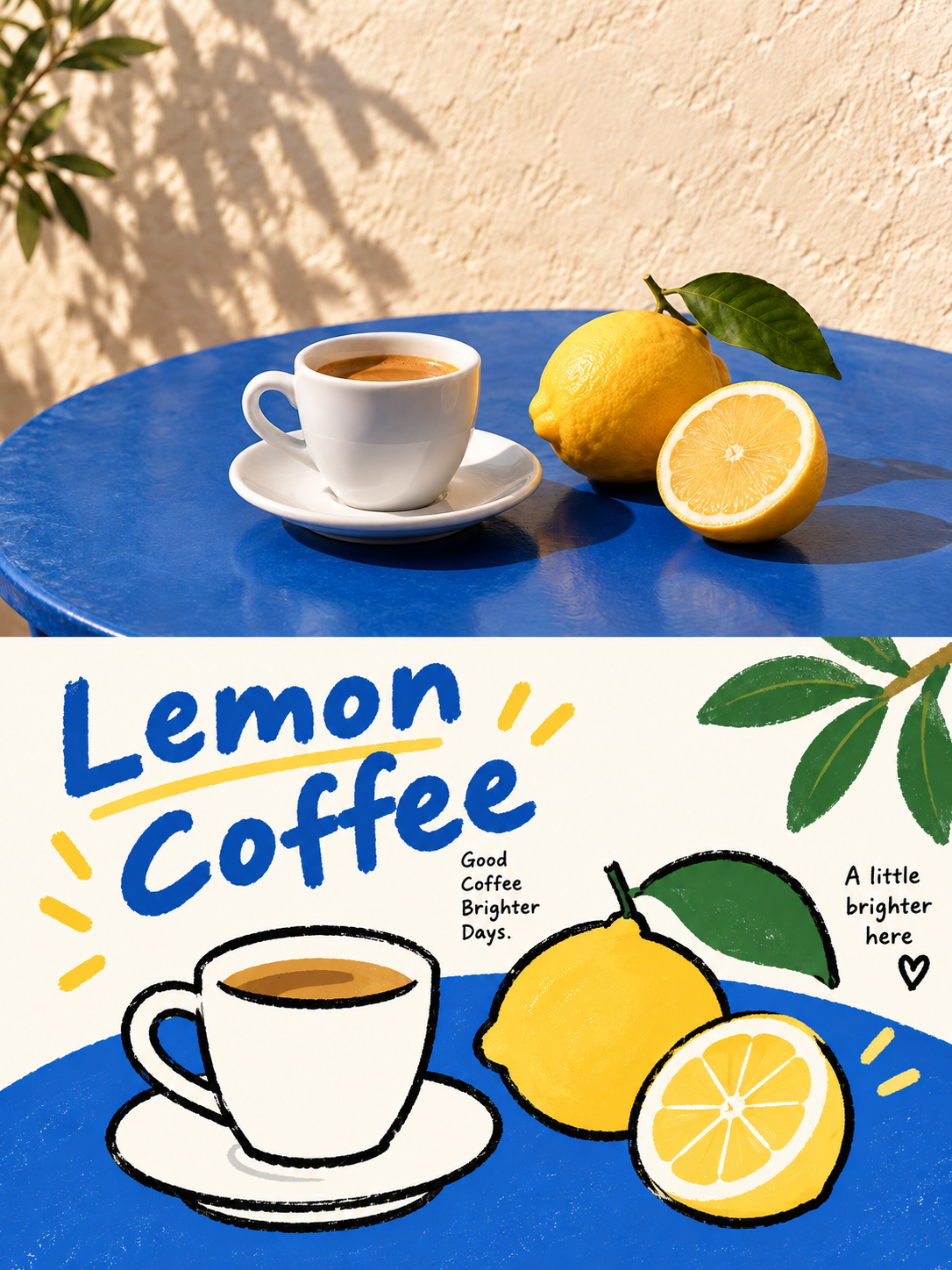
Poster chia đôi màn hình giữa ảnh thật và minh họa phẳng ngây thơ
Real Photo and Naive Flat Illustration Split-Screen Poster
Poster chia đôi màn hình giữa ảnh thật và minh họa phẳng ngây thơ — khám phá tác phẩm được tạo bằng gpt-image-2.5 trên OpenZhenZhen, kèm prompt gốc và ví dụ tạo nội dung để tham khảo.
Prompt
Prompt tiếng Trung
图1是为source_photo生成的配套素材,作为本次编辑工作流对应位置实际使用的输入图像。 使用上传的 source_photo 创建一张独立的高级设计海报。不要制作多图拼贴;每上传一张照片,就单独输出一张海报。画布采用 3:4 竖版构图,上下两个区域高度严格相等,各占画面 50%。 上半部分保留原始照片的主体结构、真实质感、自然光影和色彩氛围。只进行轻微的高级摄影调色,使其具有艺术杂志、独立出版物或展览摄影质感。为适配画幅时可以自然延展环境背景,但不得拉伸、扭曲或改变主体。 下半部分提取照片中最具识别性的主体、轮廓、姿态和叙事关系,重构为轻松、稚拙的韩式扁平编辑插画。保留原图的大致布局、物体关系和核心动作,但去除写实光影、透视和材质细节。将主体概括为圆润、简单、略带夸张的几何形状,以粗糙抖动、局部断开的黑色手绘轮廓搭配纯色平涂。插画要一眼可辨,但不要变成写实画面。 保持一个明确的视觉中心。通过大小变化、错位、遮挡、轻微裁切和不完全对称建立轻快节奏。使用大面积明亮纯色与留白承托主体,将局部或完整色块作为呼吸空间。应从原始照片中提取数量有限的高明度、高纯度颜色,不要机械套用固定色卡;亮蓝、红、黄、绿、白可以形成童趣张力。避免渐变、阴影、灰脏色、复杂混色和塑料感。 根据上传照片的主体、动作、情绪或故事提炼一个简短英文标题,并搭配少量极小短句、对象词、地点词、编号或俏皮注释。主标题可以使用粗细不均的手写感字体或轻微倾斜,小字保持清晰克制。文字可沿主体轮廓、色块边缘、留白区域或画面轴线排列,并加入轻微旋转、错位、拆分或穿插,让文字成为插画的一部分。不要添加无关文字。 最终呈现真实摄影 × 稚拙扁平插画 × 轻松编辑设计的视觉语言:明快、童趣、亲切、俏皮、松弛且有设计感。无论源照片主体是人物、动物、植物、建筑、器物、交通工具、食物还是自然场景,都要保持原图与下方插画之间清晰的视觉呼应。避免廉价卡通、复杂描绘、3D 质感、商业贴纸风和模板化儿童插画。
Prompt tiếng Anh
Image 1 is the generated supporting image for source_photo; use it as the actual input for the corresponding slot in this editing workflow. Use the uploaded source_photo to create one independent premium design poster. Never make a multi-image collage; each uploaded photo receives its own output. Use a 3:4 vertical canvas divided into two regions with exactly equal height, 50% top and 50% bottom. In the upper half, preserve the original photo's subject structure, realistic texture, natural light and shadow, and color atmosphere. Apply only subtle high-end photographic grading with an art-magazine, independent-publication or exhibition-photography feel. Extend environmental background naturally when needed for the aspect ratio, but never stretch, distort or change the subject. In the lower half, extract the most recognizable subject, outline, posture and narrative relationship from the photo and reconstruct it as a relaxed, naive Korean-style flat editorial illustration. Preserve the broad layout, object relationships and core action, but remove realistic lighting, perspective and material detail. Generalize the subject into rounded, simple, slightly exaggerated geometric shapes with rough, shaky, partly broken black hand-drawn outlines and flat solid fills. Keep the lower illustration instantly recognizable without becoming realistic. Maintain one clear visual center. Use scale changes, misalignment, occlusion, slight cropping and incomplete symmetry to create a light rhythm. Support the subject with large bright solid color areas and white space, using partial or complete color blocks as breathing room. Extract a limited set of high-brightness, high-purity colors from the original photo instead of applying a fixed palette. Bright blue, red, yellow, green and white may create playful tension. Avoid gradients, shadows, muddy gray colors, complex mixing and plastic effects. Create a short English title from the uploaded photo's subject, action, mood or story, plus only a few tiny short sentences, object words, location words, numbers or playful annotations. The title may use uneven handwritten lettering or a slight tilt; small text stays clear and restrained. Arrange text along the subject outline, color-block edge, white space or central axis, with slight rotation, misalignment, splitting or interlacing so it belongs to the illustration. Do not add unrelated text. The final visual language is real photography plus naive flat illustration plus relaxed editorial design: bright, childlike, intimate, playful and design-oriented. Whether the source subject is a person, animal, plant, building, object, vehicle, food or natural scene, preserve a clear visual echo between the original photo and the lower illustration. Avoid cheap cartoons, complex rendering, 3D textures, commercial sticker styling and generic children's illustration templates.
Xem thêm prompt hình ảnh và video · Tạo hình ảnh · Tạo video · Tạo trên canvas AI
Tác phẩm liên quan
- Poster hai phần: ảnh gốc và minh họa giấy thủ công
Poster hai phần: ảnh gốc và minh họa giấy thủ công — khám phá tác phẩm được tạo bằng gpt-image-2.5 trên OpenZhenZhen, kèm prompt gốc và ví dụ tạo nội dung để tham khảo.
- Áp phích thời trang đường phố Y2K Bạch Tố Trinh
Áp phích thời trang đường phố Y2K Bạch Tố Trinh — khám phá tác phẩm được tạo bằng gpt-image-2.5 trên OpenZhenZhen, kèm prompt gốc và ví dụ tạo nội dung để tham khảo.
- Chân dung tuyết trong nét cọ xanh băng nổi khối
Chân dung tuyết trong nét cọ xanh băng nổi khối — khám phá tác phẩm được tạo bằng gpt-image-2.5 trên OpenZhenZhen, kèm prompt gốc và ví dụ tạo nội dung để tham khảo.
- Nhân vật trong ảnh bước lên màn bóng ấm áp
Nhân vật trong ảnh bước lên màn bóng ấm áp — khám phá tác phẩm được tạo bằng gpt-image-2.5 trên OpenZhenZhen, kèm prompt gốc và ví dụ tạo nội dung để tham khảo.
- Chân dung toàn thân trong phù điêu sao xanh trắng
Chân dung toàn thân trong phù điêu sao xanh trắng — khám phá tác phẩm được tạo bằng gpt-image-2.5 trên OpenZhenZhen, kèm prompt gốc và ví dụ tạo nội dung để tham khảo.
- Chân dung tân Trung Hoa trong sân trà bóng trúc
Chân dung tân Trung Hoa trong sân trà bóng trúc — khám phá tác phẩm được tạo bằng gpt-image-2.5 trên OpenZhenZhen, kèm prompt gốc và ví dụ tạo nội dung để tham khảo.